By Alex Host · Founder of Top Care Cleaning · Updated 2026-05-04
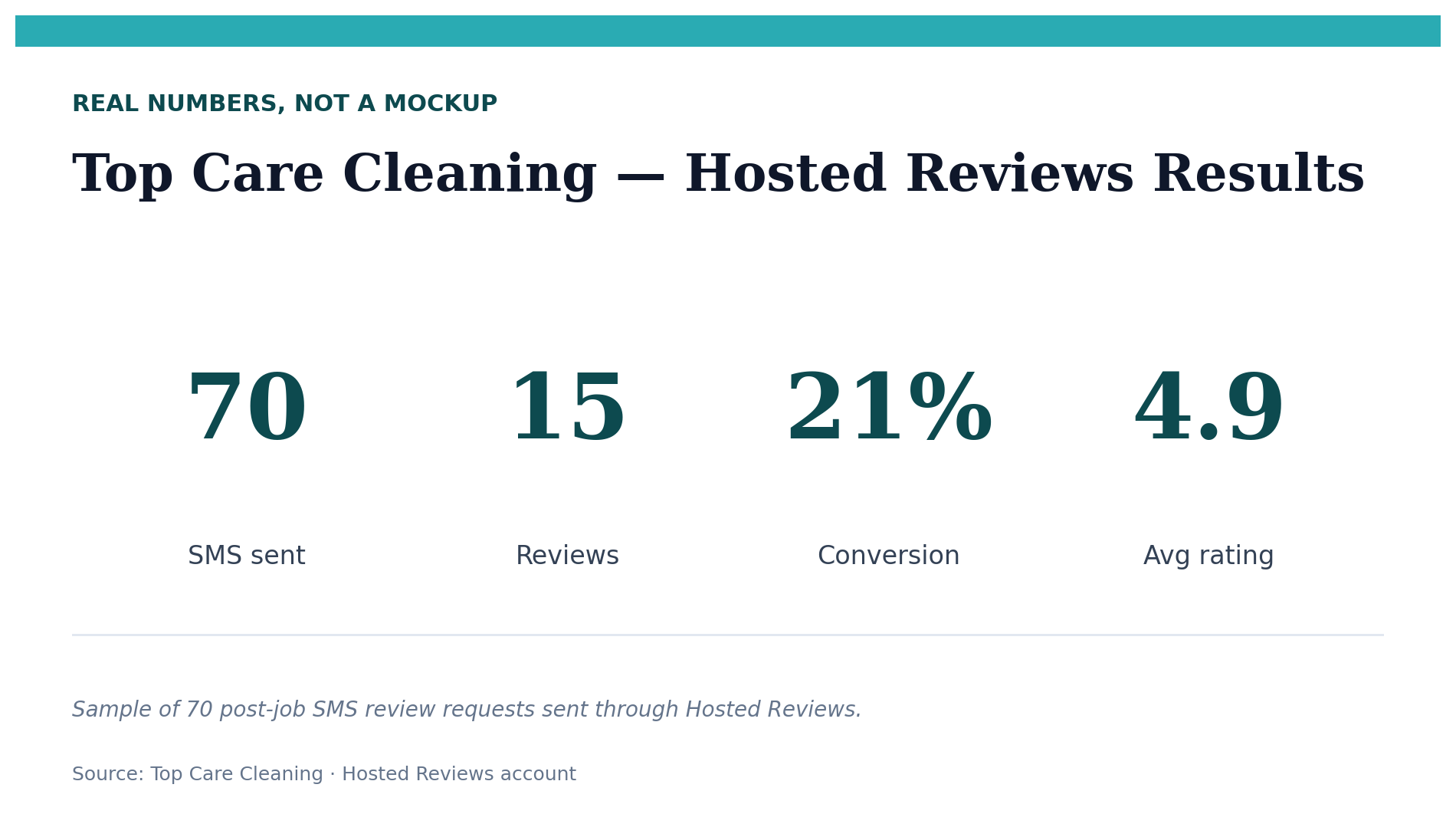
The fastest path to more Google reviews for a local service business is a post-job SMS sent within 24 hours of service completion. At Top Care Cleaning (n=70 sends via Hosted Reviews), our review-to-send rate is 21% — roughly 1 in 5 customers who receive the SMS leave a review. Tuesday sends convert at 35%; weekend sends at 0%.
Why most local service businesses plateau at the same review count
I've talked to dozens of operators who are stuck between 12 and 35 Google reviews. They've been in business for years. They do good work. Customers are satisfied. But the reviews aren't coming.
The cause is almost always one of three problems.
The manual ask problem. Asking customers for reviews one by one — in person, by phone, or by remembering to text them later — is inconsistent. Some jobs get the ask, most don't. Before I had a system at Top Care Cleaning, we sent about one manual review request per week. That's 52 requests per year on a business doing hundreds of jobs. The math never works.
The recency problem. Asking a customer a week after their service is materially less effective than asking the same day. By the time a week has passed, the job is no longer fresh in their memory. The motivation to act — the satisfaction peak that happens right after a good job — has faded. At Top Care, 71% of our reviews arrive within 24 hours of the request. Waiting even 48 hours significantly reduces conversion.
The platform problem. Operators who spread asks across Google, Yelp, and Facebook dilute their conversion rate and build thin profiles everywhere instead of a strong profile anywhere. A customer asked to leave a review on Google, then later reminded about Yelp, then tagged in a Facebook post is a customer with a fractured ask and low probability of acting on any of them. Pick one platform and own it. For local service, that platform is Google.
5 methods that actually work for local service (ranked by conversion rate)
Method 1 — Post-job SMS (highest conversion)
Send a text message to the customer within 2 hours of job completion, while the experience is still specific and visible. The message should include your Google review link — the URL that takes them directly to the five-star rating screen, no searching required.
At Top Care Cleaning, our review-to-send rate via SMS is 21% (n=70 sends). That is our real number from a real sample. Industry benchmarks from BrightLocal put SMS review request conversion at 15–30% for service businesses — our rate sits in the middle of that range.
The specific language matters less than the timing. "Hi [Name], thanks for having us today. If you were happy with your service, we'd appreciate a quick Google review — here's the direct link: [link]." Direct, no fluff, easy to act on.
If you don't have your Google review link yet, generate all three formats in 30 seconds at /tools/google-review-link.
Method 2 — Automated follow-up (catches the 79% who didn't act on Method 1)
The initial send gets some customers immediately. The 79% who didn't act aren't necessarily unhappy — they read the message, thought "I should do that," and then got distracted. A follow-up 24–48 hours later catches a meaningful portion of them.
At Top Care Cleaning, our reminder click-through rate is 35%. More than a third of customers who didn't act on the first SMS clicked the reminder. That's a significant addition to the overall conversion rate and requires almost no additional effort once the automation is in place.
The sequence: Day 0 post-job SMS with the review link → Day 1–2 reminder with the same link, slightly different phrasing. "Hi [Name], just a quick follow-up — if you haven't had a chance to leave that Google review, we'd really appreciate it. Takes about 30 seconds: [link]."
Method 3 — In-person ask at job completion (lower conversion, zero cost)
Before your technician leaves the job, a direct verbal ask sets up the SMS that follows. The script at Top Care: "If you were happy with today's service, I'd really appreciate a Google review — I'll text you the link so it's easy."
This works for two reasons. First, it creates a social commitment — the customer said yes in person, which increases the probability they follow through on the text. Second, it frames the text message as expected rather than a surprise. Customers who were primed by a verbal ask convert at a higher rate on the follow-up SMS.
In-person asks don't scale without the SMS follow-up, but they're a high-value addition for your best customers: long-term relationships, first-time exceptional jobs, and customers who expressed verbal satisfaction during the service.
Method 4 — Email follow-up (secondary channel)
Email is a workable secondary channel, particularly for businesses with strong email lists or customers who prefer written communication. Top Care has not run a controlled email arm for review requests — we don't have a head-to-head conversion comparison from our own data. What I can say from industry research: BrightLocal's data indicates that email review requests typically convert at lower rates than SMS for service businesses, with email open rates for service business marketing around 22%. The multi-step process (open email → click link → leave review) creates more friction than a text message where the link is right there.
If you use email, the same timing rules apply: send within 24 hours of job completion, use a specific subject line ("How was your [service] today?"), and include the direct review link rather than linking to your website.
Method 5 — QR code on leave-behind (lowest conversion, highest reach for non-SMS customers)
A printed card, door hanger, or receipt with a QR code linking to your Google review page captures customers who don't respond to digital asks. This is particularly useful for older customers and for jobs where you don't collect a phone number.
The QR code should link directly to your review page, not your website. Test it on multiple phones before printing.
Our experience at Top Care with leave-behind QR codes has been modest — the conversion rate is lower than SMS, and the cards require physical printing and distribution. But for customers who aren't in your SMS workflow, a leave-behind is the only digital ask available.
The timing window — why 24 hours is the rule
At Top Care Cleaning, 71% of our reviews came in within 24 hours of the request being sent. The median time from send to review was 2.5 hours. This is not an accident — it reflects how customer motivation works.
Immediately after a service job, the experience is specific and present. The customer can describe what the technician did, what the result looked like, and how they felt about the interaction. Ask them then, and they have something concrete to say. Ask them a week later, and the job blends into the background of their week.
The day-of-week pattern in our data is stark: Tuesday sends convert at 35%. Wednesday sends drop to 7%. Weekend sends produce zero reviews in our sample. We don't fully understand the Wednesday drop-off — our hypothesis is the mid-week work pile-up, where customers are in high-stress periods and less likely to complete low-priority tasks. We're continuing to collect data.
Time of day reinforces the pattern: morning sends (6am–12pm) produced our strongest review rate at 33% of sends in that window converting to reviews. This aligns with the idea that customers check messages in the morning and are in a more responsive headspace early in the day.
The practical implication: if you have scheduling flexibility, send review requests on Tuesday mornings. If you can't control the day because jobs complete whenever they complete, at minimum send the same day — within 2 hours of job completion when possible.
What NOT to do (common mistakes that hurt you)
Asking multiple platforms at once. A customer can only split their attention so many ways. Asking for Google, Yelp, and Facebook reviews in the same message produces lower conversion on each platform. Ask for one thing, make it easy.
Incentivizing reviews. Offering a discount, gift card, or any other reward for leaving a review violates Google's review policies. Reviews obtained through incentives can be removed by Google, and patterns of incentivized reviews can result in penalties to your GBP. This is not a gray area.
Posting from business devices. Reviews posted from the same IP address as your GBP raise flag patterns. Never ask employees to post reviews from the office network, the business tablet, or any device associated with your business location.
Buying reviews. Operators get pitched review-buying services regularly. These services are universally against Google's terms of service. Purchased reviews get filtered, removed, or trigger profile penalties. The short-term count bump is not worth the long-term risk.
Sending from an unregistered SMS number. If you're sending review request texts at volume, your number should be registered under A2P 10DLC (Application-to-Person 10-digit long code) regulations. Sending marketing SMS from an unregistered number creates deliverability problems and potential TCPA compliance exposure.
Building a repeatable system vs one-off campaigns
The fundamental shift in thinking: the goal is reviews per job completed, not reviews per campaign.
A campaign — "let's send 100 texts this week" — produces a spike and then nothing. A system — "we send a review request after every completed job, automatically" — produces consistent, compounding velocity. At Top Care, our review count grew slowly and inconsistently before we had a system. After building the automated workflow, we average 3–5 new reviews per week on active weeks.
The three components of the system:
Component 1: Your Google review link. Get it once, save it in your system. Generate all formats at /tools/google-review-link. The full toolkit for finding and using your review link is at The Google Review Link Toolkit.
Component 2: Your timing rule. Same day, within 2 hours of job completion. Morning if possible. Weekday if possible. This is the rule — the automation enforces it.
Component 3: Your delivery channel. SMS first, reminder second. Email as a secondary channel for customers not in your SMS workflow.
Hosted Reviews automates the SMS send, the follow-up reminder, and tracks conversion by technician. Start a 14-day trial — no card required: app.hostedreviews.com.
Frequently asked questions
How many reviews should I aim for?
As many as your competitor has, plus more. Practically: get to 50 to establish credibility, 100 to become competitive in the local pack, and build consistently from there. Review velocity matters more than hitting a specific count.
Is it legal to ask customers for Google reviews?
Yes. Google's review policies explicitly permit asking customers for reviews. The restrictions are around incentivization (prohibited), directing customers to leave only positive reviews (prohibited), and posting from business devices (prohibited). A straightforward ask is fully compliant.
How long does it take to get my first 100 reviews?
At a 21% review-to-send rate, you need roughly 500 sends to accumulate 100 reviews. If you complete 50 jobs per month and send after every job, that's 500 sends over 10 months. Faster if your job volume is higher; slower if it's lower. The math rewards consistent volume — one job per day beats one campaign per month.
What's the best time of day to ask for a Google review?
Morning sends (6am–12pm) produce our strongest conversion at Top Care — 33% review rate for sends in that window. Tuesday mornings are optimal in our data. If you can't control the timing because jobs complete at unpredictable hours, prioritize same-day sends over waiting for the "right" time.
About the author
Alex Host runs Top Care Cleaning, a Grand Rapids cleaning and exterior service with 400+ Google reviews, and built Hosted Reviews to automate what he was doing manually. I run Top Care Cleaning, a Grand Rapids cleaning and exterior service with 400+ Google reviews, and I built Hosted Reviews to automate what I was doing manually. Read more at hostedbrands.com/about.