By Alex Host · Founder of Top Care Cleaning · Updated 2026-05-04

Review schema (also called structured data markup) is code you add to your website that tells Google your page contains review information — including your average star rating and review count. When Google reads it correctly, your star rating can appear in search results as a "rich snippet," increasing click-through rates. For local service businesses, this markup goes on your homepage or service pages.
What review schema actually does (and what it doesn't do)
Schema markup is machine-readable metadata. It tells Google's crawlers what type of content is on a page — not just the text, but the meaning of the text. For a business website, AggregateRating schema says: "This page contains a business rating. The average score is 4.9. It's based on 400 reviews."
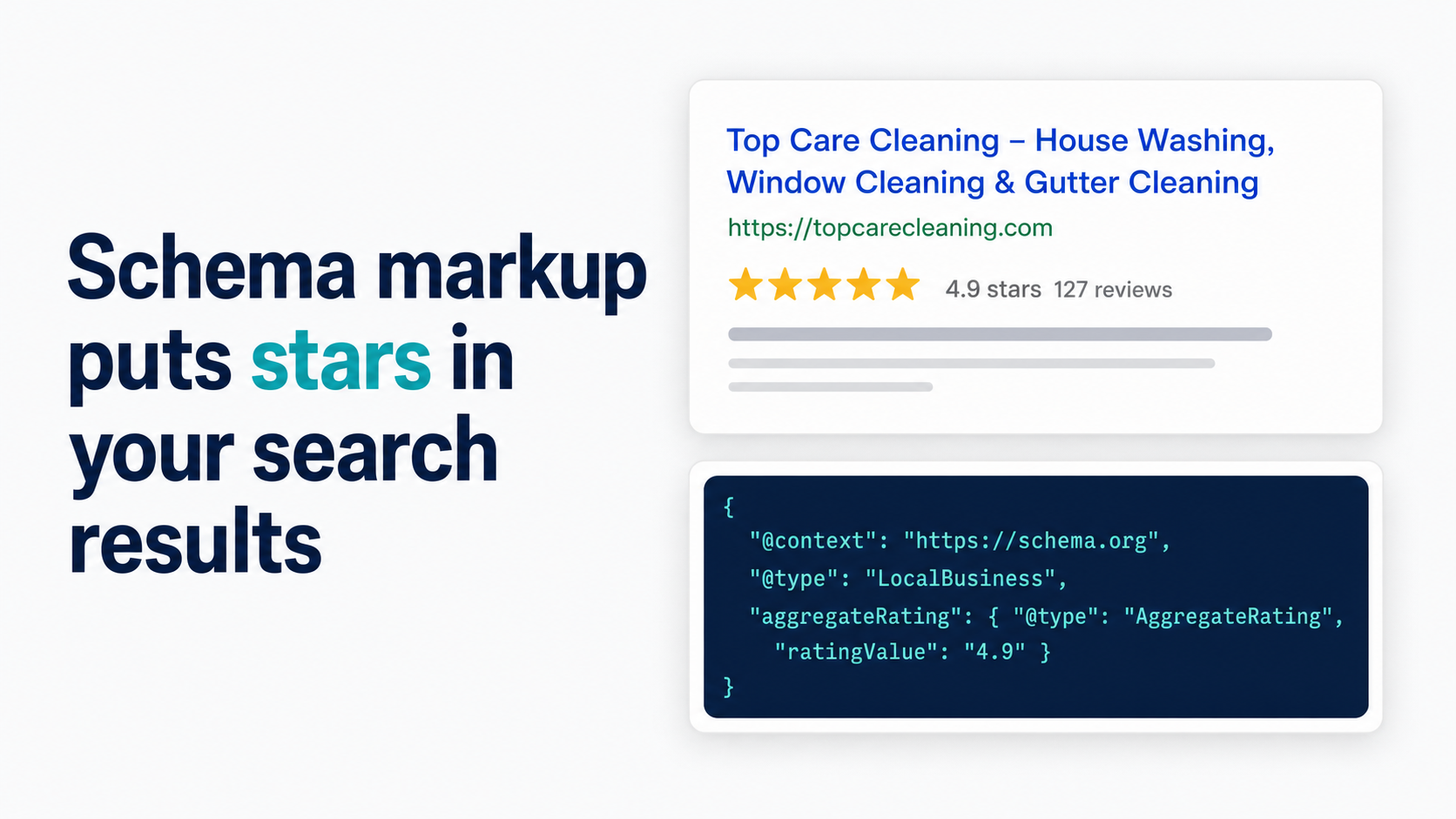
When Google reads and validates that schema correctly, it may display the star rating in the search result — the gold stars you see under some business listings in organic search results. This is called a rich snippet.
What schema does:
- Tells Google your page contains structured review data
- Makes your search listing eligible for the star rating display
- Increases click-through rate from existing ranking positions when stars appear
What schema doesn't do:
- Improve your organic ranking position directly
- Guarantee that Google will display the rich snippet (Google chooses whether to show it)
- Substitute for actual reviews — the rating displayed must match real review data on your site or GBP
The most common misconception: "adding schema will get me more stars in Google." Schema is one requirement. Google must also validate the markup, confirm that the review content is visible on the page, and choose to display the snippet for that particular query. The schema creates eligibility; Google decides whether to display.
When I added AggregateRating schema to the Top Care Cleaning homepage, the rich snippet began appearing in branded search results within approximately three weeks. It shows our star average and review count directly in the organic listing — visible before anyone clicks.
The two schema types for local service reviews
AggregateRating schema (show your overall star average)
AggregateRating schema is what most local service businesses want. It represents your overall rating — the average across all your reviews — and the total review count. Here's what the JSON-LD code looks like:
{
  "@context": "https://schema.org",
  "@type": "LocalBusiness",
  "name": "Your Business Name",
  "aggregateRating": {
    "@type": "AggregateRating",
    "ratingValue": "4.9",
    "reviewCount": "400",
    "bestRating": "5",
    "worstRating": "1"
  }
}
This goes in a <script type="application/ld+json"> tag in the <head> or <body> of your page. Google's Structured Data — Review snippet documentation covers the required and recommended properties.
Key rules for AggregateRating:
- The
ratingValueandreviewCountmust reflect actual review data visible on the page or tied to the entity - You cannot markup a rating that isn't substantiated by real reviews
- The
@typeshould match your business type —LocalBusinessis the broadest option; more specific types likeHomeAndConstructionBusinessorCleaningServiceare also valid and may be more semantically precise
Review schema (individual review markup)
Individual Review schema marks up a specific review text — the reviewer's name, their rating, and the review content. This is less common for service businesses and is typically used on dedicated testimonials pages.
For most local service businesses, AggregateRating on the homepage is the right starting point. Individual Review schema on a testimonials page is an optional enhancement if you have a structured testimonials section.
How to add review schema to your website
For WordPress users
Plugin route (recommended for non-technical operators): Both Yoast SEO and RankMath include schema configuration options. In Yoast SEO, go to SEO → Search Appearance → Local SEO (if you have Yoast Local SEO) or use the Schema tab in the post/page editor. In RankMath, the schema settings are in the Schema tab when editing a page.
Manual route: Paste the JSON-LD block into the <head> section of your site using a header/footer plugin like "Insert Headers and Footers" or by editing your theme's header.php file. Manual is more reliable than plugin injection for schema markup accuracy.
For Wix, Squarespace, Shopify users
These platforms have limited native schema injection options. For Wix, the SEO settings panel allows some structured data inputs, but full JSON-LD control typically requires a paid Wix plan and custom code injection via the Velo development environment.
For Squarespace and Shopify, JSON-LD injection works via code injection settings (Squarespace: Settings → Advanced → Code Injection; Shopify: theme editor → theme.liquid). Place the schema block between <head> and </head>.
Some platforms' own SEO apps (Yoast for Shopify, SEO tools in Squarespace) handle basic schema automatically, but verify the output with Google's testing tool.
Testing your schema
Before considering schema "live," validate it with Google's Rich Results Test. Paste your URL (or paste the raw code) into the tool and run the test. The tool shows:
- Whether the schema is valid
- Which rich result types it's eligible for
- Any errors or warnings
Fix all errors before publishing. Warnings are advisory; errors prevent rich snippet eligibility. Re-test after any site template update that might affect how schema is injected.
What Top Care Cleaning's schema looks like
The AggregateRating schema on the Top Care Cleaning website follows the standard JSON-LD format. The ratingValue and reviewCount are updated periodically to match our current GBP data. We use LocalBusiness as the base type with CleaningService as the more specific subtype.
The schema block is placed in the <head> section and applies to the homepage. Service-specific pages (window cleaning, gutter cleaning, pressure washing) have their own service-specific schema alongside the base business schema.
The practical timeline from implementation to rich snippet display: for Top Care, the AggregateRating snippet appeared in branded search results (searches for "Top Care Cleaning Grand Rapids") within about three weeks of implementation. Rich snippet display for category queries is less consistent and depends on whether Google chooses to show it for that query type.
Common schema mistakes for local service websites
Using schema on pages without review content. If your homepage doesn't display any actual review content — not even a "4.9/5 based on 400 reviews" sentence — and you add AggregateRating schema to it, Google may not display the rich snippet. The markup needs to correspond to visible content.
Marking up reviews not displayed on the page. Google's guidelines state that you should only use structured data to describe content that's visible on the page. Schema for reviews that exist somewhere else (on Yelp, in a spreadsheet, in your memory) violates this principle.
Using incorrect schema type. LocalBusiness schema and Review schema serve different purposes. LocalBusiness with an aggregateRating property is what surfaces stars in organic results. Review schema (standalone) is for marking up individual review text. Mixing them incorrectly produces invalid markup that doesn't produce any rich snippet.
Not re-validating after template updates. Site updates, platform migrations, and theme changes can break schema injection. Validate with Google's Rich Results Test after any significant site change.
Schema and the Google review widget connection
If you embed Google reviews on your site using a widget (covered in How to Embed Google Reviews on Your Website), the review content rendered by the widget is eligible to support AggregateRating schema markup. The widget makes the reviews visible on the page, and the schema makes the rating machine-readable.
The two-layer setup: embed the widget (visible review content for users and Google's crawlers) + add AggregateRating schema (machine-readable metadata for the rich snippet). Both layers are needed for the full effect.
Closing
Hosted Reviews automatically embeds your latest Google reviews with compatible schema. Start a 14-day trial — no card required: app.hostedreviews.com.
Frequently asked questions
Does review schema improve my Google ranking?
Not directly. Schema markup creates eligibility for rich snippets, which can increase click-through rates from positions you already hold. It does not lift your organic ranking position. The SEO value is in improved CTR, not ranking movement.
Can I add star ratings to any page?
You can add schema to any page, but Google will only display stars for pages where the schema is valid and the underlying review data is real and verifiable. Adding AggregateRating to every page without corresponding review content on each page will not produce stars on every page — it will produce errors in Google's Rich Results Test.
How long does it take for Google to show rich snippets?
Variable. For Top Care Cleaning, the AggregateRating snippet appeared in branded search results within about three weeks of implementation. Some businesses report faster; some report longer, particularly for new domains without established crawl frequency. After validating your schema, give it 4–6 weeks before drawing conclusions.
Do I need a developer to add review schema?
Not necessarily. WordPress users can use Yoast SEO or RankMath to handle basic schema without writing code. For platforms like Squarespace or Shopify, code injection is required — it's a copy-paste operation, not programming, but it does require navigating platform settings. If you're not comfortable with code injection, a developer can implement it in under an hour.
About the author
Alex Host runs Top Care Cleaning, a Grand Rapids cleaning and exterior service with 400+ Google reviews, and built Hosted Reviews to automate what he was doing manually. I run Top Care Cleaning, a Grand Rapids cleaning and exterior service with 400+ Google reviews, and I built Hosted Reviews to automate what I was doing manually. Read more at hostedbrands.com/about.