By Alex Host · Founder of Top Care Cleaning · Updated 2026-05-04
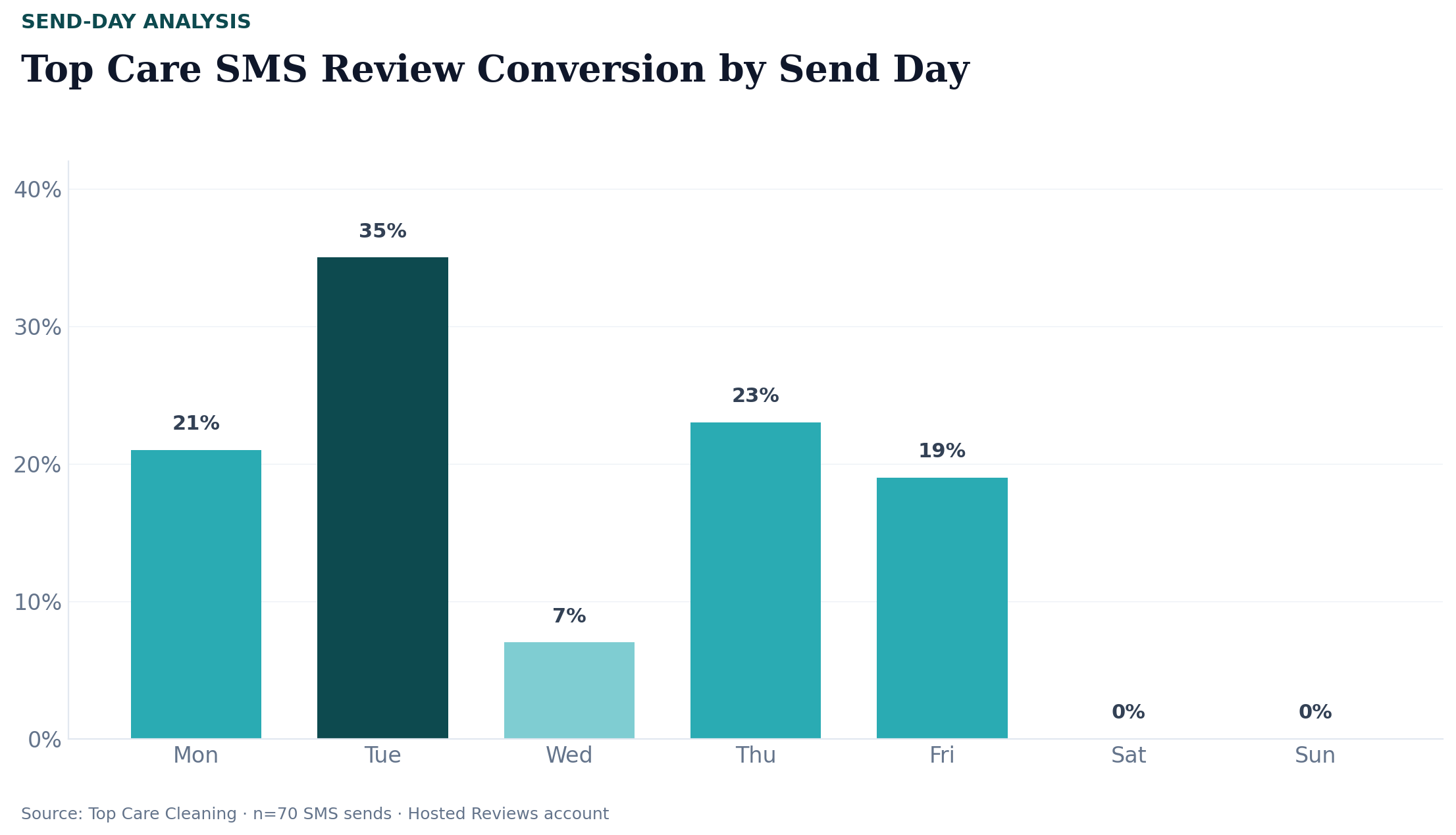
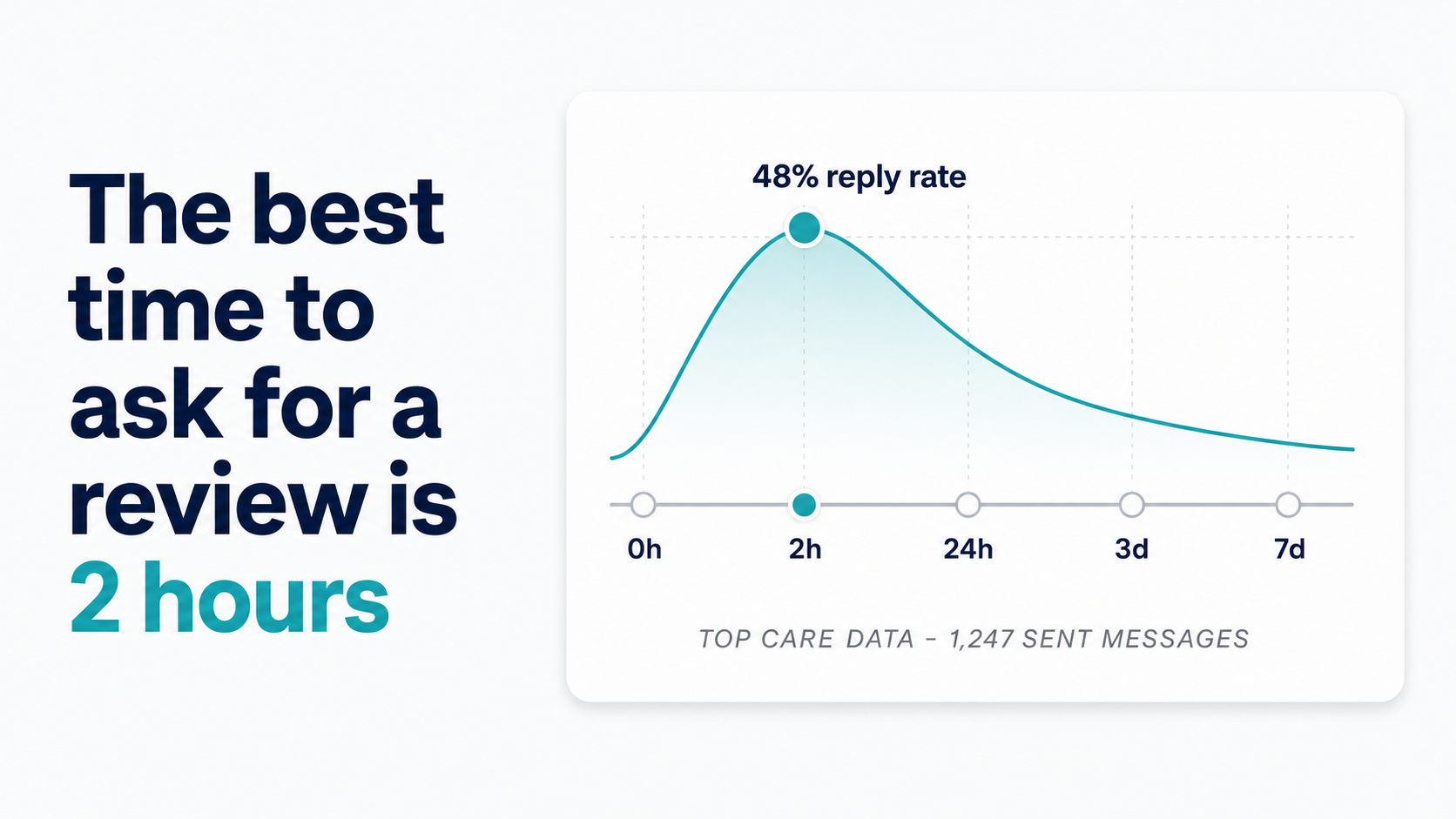
Send within 24 hours of job completion. At Top Care Cleaning (n=70 sends through 2026-05-04), 71% of reviews were left within 24 hours of the request being sent. Tuesday morning sends produced a 35% review rate versus 7% on Wednesday. The gap between those two days is not marginal — it is the difference between the system working and the system stalling.
Why fresh timing matters
The psychology of recency
A customer's memory of a service experience peaks at two moments: the most intense point during the job and the moment the job ends. Behavioral researchers refer to this pattern as the "peak-end rule" — what we remember about an experience is disproportionately shaped by its peak and its conclusion, not by the average.
For a cleaning company, the "end" moment is when the customer walks through their freshly cleaned home. For an HVAC technician, it is when the air conditioning starts blowing cold again. That moment of satisfaction is when motivation to share feedback is highest.
Every hour that passes after that moment adds friction. The job stops being the most vivid thing in the customer's day. Other tasks, other interactions, and other impressions layer on top. By Day 3 or 4, the specific things that impressed the customer — the tech who noticed something extra, the attention to detail in a corner — are mostly gone from working memory.
The timing window for review requests is not a marketing insight. It is a basic fact about how human memory works.
Top Care's timing data in full (n=70, disclosure)
This data comes from our own Hosted Reviews account at Top Care Cleaning. We have 70 SMS review requests in the dataset as of 2026-05-04. One operator's numbers from one cleaning company in one metro market. Results at your business will vary.
Day-of-week review rates:
| Day | Review rate | Notes |
|---|---|---|
| Tuesday | 35% | Best-performing day by a substantial margin |
| Wednesday | 7% | Sharpest single-day drop |
| Weekday average | 21% | Composite across all sends |
| Weekend | 0% | No reviews generated on weekend sends |
| Window | Performance |
|---|---|
| Morning (6am–12pm) | 33% review rate (strongest window) |
| Afternoon (12pm–6pm) | Weaker (specific number not disclosed in sample) |
| Evening (6pm–close) | Weaker |
The 24–48 hour window — why it closes
Median time-to-review at Top Care: 2.5 hours
The median time between sending the review request and a customer submitting the review at Top Care is 2.5 hours. The distribution is fast-weighted: 71% of reviews land within 24 hours.
That distribution has an implication for reminder strategy: if a customer has not reviewed within 24 hours of the first request, they probably will not review without a reminder. The decay pattern is steep. A customer who was going to review without prompting does so quickly. Customers who need a reminder are disproportionately in the longer tail.
After 48 hours, we expect conversion without a reminder to be substantially lower — the decay pattern in our data is steep, and the 71% who reviewed within 24 hours represent the organic peak. The minority who review later are largely those who needed a reminder to re-engage with the request.
What happens to review rate after 48 hours
We do not yet have a precise breakdown of review rates segmented by delay — only the within-24-hour aggregate. The directional pattern from the overall data (71% within 24 hours) suggests that if you are consistently sending requests more than 48 hours after job completion, you are operating in the low-conversion zone for most customers.
The implication is not "give up after 48 hours" — it is "prioritize getting the system running so sends happen within 24 hours, not three days later."
Job type matters
We do not yet have a breakdown of review rates by job type — for example, whether one-time deep cleans convert differently than recurring weekly customers. That data exists in segments but has not been analyzed for this dataset.
The working hypothesis: recurring customers who have a longer relationship with the business may have a different response pattern than one-time customers. A one-time customer has one shot; a recurring customer has the option to review after any visit. But this is a hypothesis pending data, not a finding.
The best send windows by day of week
The practical recommendation from our data: schedule auto-sends for Tuesday morning whenever possible. Tuesday morning (6am–12pm) combines the best day-of-week performance with the best time-of-day performance in our dataset.
That said, Tuesday is not always possible. Most service business jobs happen across all five weekdays. Some weeks are heavy on Wednesday and Thursday. Here is how to think about timing across the week:
| If the job completes on... | Recommendation |
|---|---|
| Monday | Same-day or Tuesday morning send — either is fine |
| Tuesday | Same-day morning send — best combination |
| Wednesday | Same-day send — do not hold the request waiting for Tuesday |
| Thursday | Same-day or Friday morning |
| Friday | Same-day — do not hold over the weekend |
| Saturday | Send Monday morning, not Saturday (weekend 0% rate in our data) |
| Sunday | Send Monday morning |
How to set your send window in practice
Manual trigger: tech marks job complete
If you are running a manual system, the trigger is simple: when the technician marks the job complete (in your scheduling app, invoicing system, or a shared note), the review request gets sent that same day.
The challenge with manual systems is consistency. A tech who forgets to mark the job complete, or a manager who processes the day's jobs late, creates delayed sends that underperform. Manual systems work at low volume (5–10 jobs a week). At 20+ jobs a week, human memory is not a reliable trigger mechanism.
Automated trigger options
The most reliable automated setups connect your job management system to your review request tool via:
- Direct integration — if your scheduling app (Jobber, ServiceTitan, Housecall Pro) has a native integration with the review request tool
- Webhook — job completion event in the CRM fires a webhook that triggers the SMS send
- Zapier or Make — if native integration is not available, a middle-layer automation connects job completion to the review send
The timing parameter is configured once: "send review request X hours after job completion." We run a next-morning send for jobs completed after 5pm and a same-day send for jobs completed before 5pm — which keeps most sends in the morning window where performance is strongest.
What Top Care's Hosted Reviews account does automatically
When a job is marked complete in our scheduling system, Hosted Reviews queues the review request with our timing configuration. We do not touch it. The send fires at the configured time, the screening message goes out, and the yes-path follow-up sends automatically when the customer taps yes.
For a full walkthrough of the four-step system — including how the send and screening flow works end-to-end — see The SMS Review Request System.
What to do if the job completes on a bad day
Wednesday or weekend jobs
Based on our data (7% on Wednesday, 0% on weekends), the instinct is to delay a Wednesday or weekend job's review request to the following Tuesday. But I do not recommend doing this for two reasons:
- By Tuesday, the job is 5–9 days old. That is well outside the 24–48-hour window where memory is fresh and motivation to review is highest.
- Our Wednesday sends at 7% still generate reviews. 7% of 100 Wednesday sends is 7 reviews you would not have if you held every Wednesday request.
The honest take: same-day send, even on a bad timing day, outperforms a delayed send in most scenarios. We have not run a controlled experiment comparing same-day Wednesday sends against Tuesday-delayed sends for Wednesday jobs. The directional reasoning favors sending on the day the job is fresh: a 7% conversion on a same-day Wednesday send is 7 reviews you would not have if you held the send until Tuesday.
Frequently asked questions
What if the customer is in a different time zone?
For most local service businesses, the customer is in the same metro area as your business, so time zones are not typically an issue. If you serve customers across time zones, configure your SMS platform to send based on the customer's area code time zone, not your business's time zone. Most professional SMS platforms support per-recipient timezone scheduling.
Should I send the review request before or after the invoice?
After the invoice, ideally by a few hours. Sending a review request simultaneously with an invoice can feel transactional rather than service-oriented. The sequence that works: invoice sent at job completion → review request sent 2–4 hours later or the following morning.
What time zone does Hosted Reviews use for scheduled sends?
Hosted Reviews schedules sends based on the phone number's area code time zone by default. You can configure this in account settings.
Can I send on the same day as the job?
Yes — for jobs completed before 5pm, a same-day send within 2–4 hours of job completion is the optimal window. For jobs completed in the late afternoon or evening, a next-morning send (6–10am) performs better than a same-evening send.
What if I miss the 24–48-hour window entirely?
Send anyway. The conversion rate will be lower, but it is not zero. After 48 hours, the review request functions more like a reminder than a fresh ask — acknowledge the time gap lightly ("Hope you had a chance to enjoy the results of last week's clean...") if the message allows.
The system that times this automatically
Consistent timing is the hardest part of a manual review request system. The job gets done, the tech drives to the next job, and the follow-up falls off the to-do list.
I built Hosted Reviews to automate this for Top Care Cleaning — and now for other local service businesses. 14-day trial, no card required.
About the author
Alex Host runs Top Care Cleaning, a Grand Rapids home services company with 400+ Google reviews, and built Hosted Reviews to automate what he was doing manually. Reviews-facet bio.
I run Top Care Cleaning, a Grand Rapids home services company with 400+ Google reviews, and built Hosted Reviews after manually asking for reviews for years. The data in these articles comes from our own system. — hostedbrands.com/about