By Alex Host · Founder of Top Care Cleaning · Updated 2026-05-04
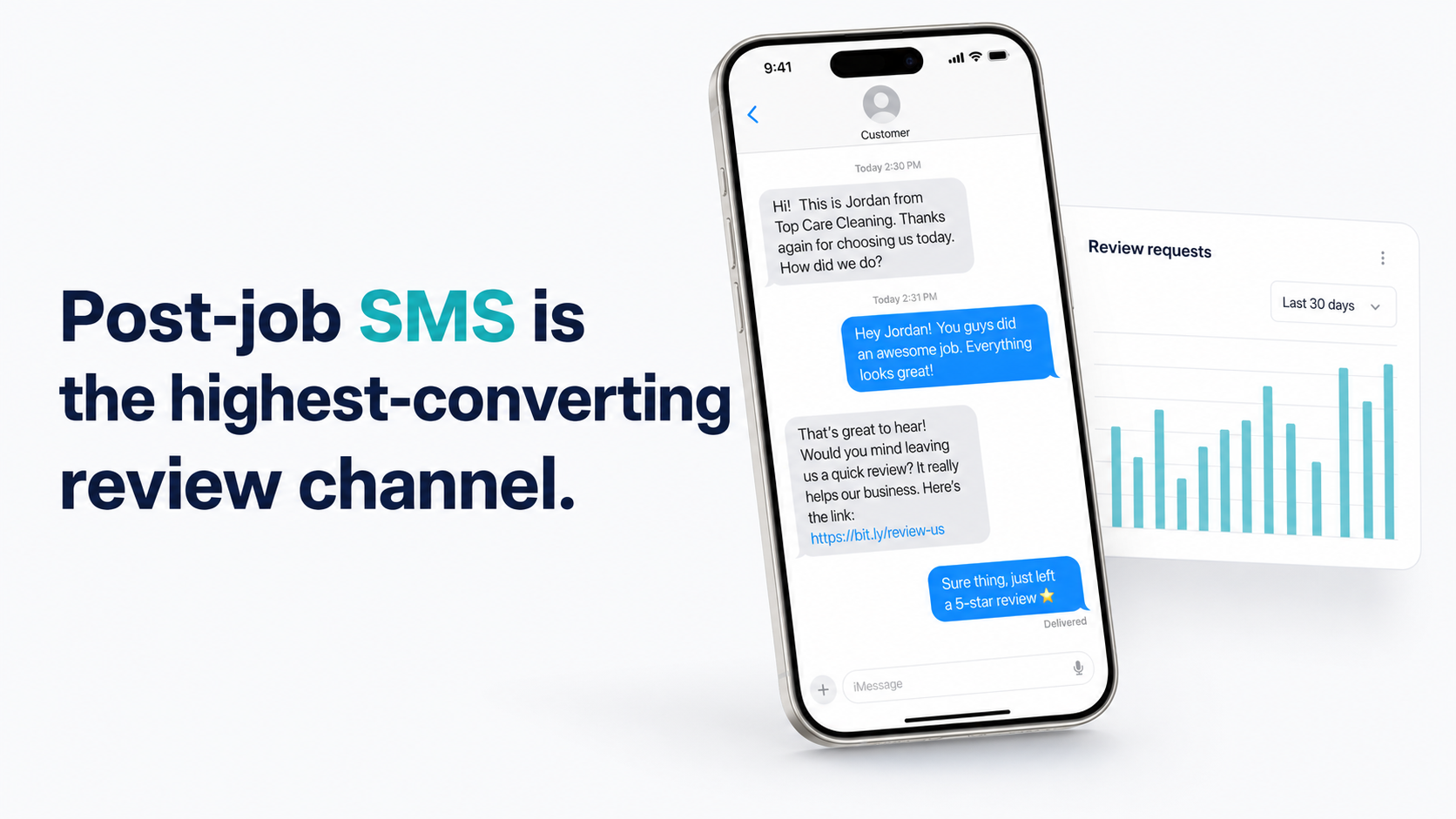
Sending a text message is the most effective way to ask a customer for a Google review. At Top Care Cleaning, we send a text within 24 hours of every completed job, use a two-step screening message before the public review link, and convert 21% of text requests into published reviews. The system is repeatable, automatable, and takes about 15 minutes to set up.
What the system actually looks like
Most businesses try this once, get a handful of reviews, and give up when the responses stop. The difference between that experience and a consistent flow of reviews is having a system with defined steps — not a one-off ask you remember to send when you think about it.
Here is the four-step SMS review funnel we use at Top Care:
- Opt-in — the customer provides a mobile number and consents to receive texts from us at job booking
- Timed send — the review request goes out within 24–48 hours of job completion (usually automatically)
- Screening tap — the customer answers "How did we do?" before seeing the public review link
- Review link — only customers who tapped "yes" receive the direct Google review link
Every step matters. Skip the opt-in and you have a compliance problem. Skip the screening and you are sending unhappy customers straight to Google. Skip the timing window and you lose the reviews to friction before they happen.
The four-step SMS review funnel
The funnel is linear but each stage has its own conversion math. In our Top Care data (n=70 sends through 2026-05-04):
| Stage | Rate | What happens |
|---|---|---|
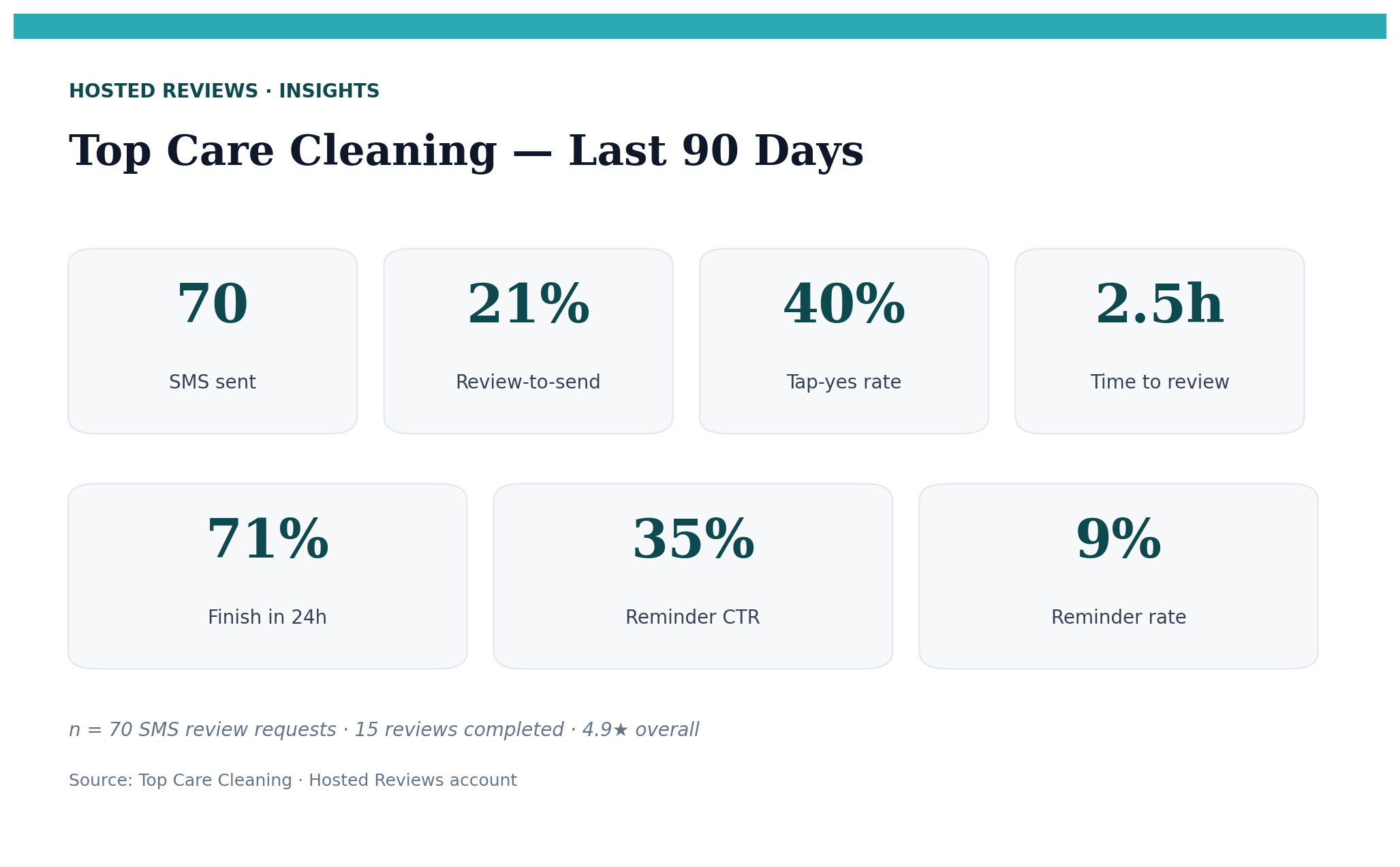
| Send to Tap Yes | 40% | Customer taps "Yes, we're happy" on the screening message |
| Tap Yes to Review completed | 54% | Happy customer actually submits the Google review |
| Net review-to-send rate | 21% | Published review for every 5 texts sent |
This is one operator's data from one cleaning company in one market. Your numbers will vary. But the funnel structure — opt-in, timed send, screening, link — is what makes those numbers possible. Without the structure, the number is effectively zero because you are not asking consistently.
Why SMS outperforms every other channel for review requests
Email review requests convert at 2–5% in industry benchmarks (Mailchimp and Campaign Monitor service-business averages). Our SMS system converts at 21%. The gap is not mysterious: SMS messages are read within minutes of receipt, while email sits in a tab until the customer opens it — which may be days later or never.
The timing window matters more than any other variable. A customer who loved your service at 10am on Tuesday will struggle to recall the details by Friday. SMS arrives while the experience is still fresh and emotional memory is intact.
Published SMS industry data shows open rates above 90%, compared to 20–25% for email in service industry categories (CTIA aggregate benchmarks). But open rate is not conversion rate. The conversion advantage for review requests comes from the combination of speed, immediacy, and the tap-to-submit path from a phone that is already in the customer's hand.
Top Care data summary: review-to-send rate 21%, median time-to-review 2.5 hours, 71% of reviews left within 24 hours (n=70 sends, through 2026-05-04).
These numbers come from our own Hosted Reviews data from Top Care Cleaning — one operator's results. Your numbers will vary depending on service type, customer base, and message quality. We publish them because operator-sourced data is more useful than generic industry claims, and because transparency about sample size (n=70) is more honest than pretending we have a statistically definitive database.
What you need before you start
Three things, in order:
- A verified Google Business Profile. You need your GBP review link before you can send it to anyone. Get your Google review link toolkit here — find it in your GBP dashboard or use the Hosted Reviews generator (takes 30 seconds, no account required).
- A compliant SMS sender. A personal phone number is not sufficient for a business running automated sends. You need a registered business number with A2P 10DLC registration — more on this in the compliance section below and in the TCPA compliance guide.
- An opt-in process. Written consent from customers before you send them a marketing text. This is not optional under the TCPA.
The compliance piece trips up a lot of businesses early. The good news is that A2P 10DLC registration is a one-time setup, not an ongoing burden. Once you have a verified sending number and a documented opt-in process, the compliance infrastructure is in place for as long as you run the system.
Step 1 — Getting the opt-in right
The opt-in is the most important step in the system and the one most businesses skip. If you skip it, you are not legally compliant. If you do it wrong, you are not legally compliant. Getting it right is not complicated, but it requires actually building the process rather than assuming consent exists because a customer gave you their phone number.
What counts as consent under TCPA
The Telephone Consumer Protection Act (47 U.S.C. § 227) requires "prior express written consent" before sending marketing texts via an automated system. A review request is generally considered a marketing communication because it benefits the business, even if it also benefits the customer who wants to share feedback.
"Written consent" in this context includes a checkbox on a digital booking form, a signature on a paper invoice, or a text confirmation flow where the customer actively agrees. A customer calling to book and giving their phone number verbally is not sufficient documentation for automated sends.
The consent language needs to tell the customer: (1) who is texting them, (2) what type of messages they will receive, and (3) that they can opt out by replying STOP.
For a detailed breakdown of TCPA requirements — including the A2P 10DLC registration process, opt-out mechanics, and what "prior express written consent" actually looks like in practice — see TCPA Compliance for Review Request Texts: What You Actually Need to Know.
Where to collect opt-in
The best opt-in moments happen when the customer is already engaged in the booking flow:
- Booking form checkbox — "By providing your mobile number, you consent to receive automated service updates and review requests from [Business Name]. Reply STOP to opt out."
- Invoice footer — adding the opt-in language to your standard invoice means customer signature on the invoice doubles as consent documentation
- Technician verbal confirmation at job completion — "I'm going to send you a quick text to make sure everything went well. Is that okay?" Document the verbal confirmation in your job notes and follow up with a text confirmation the customer must reply to
The booking form approach is the cleanest because consent is captured in writing before any service is delivered, documentation is automatic, and the customer actively chose to provide their number.
The exact opt-in language Top Care uses at job booking
"By providing your mobile number, you consent to receive automated review requests and service-related text messages from Top Care Cleaning. Message and data rates may apply. Reply STOP to opt out."
This language — or a functional equivalent — is what satisfies the TCPA written consent requirement for a service business operating in the residential cleaning category.
Whatever language you use, the key requirements are: business name identified, message type described, frequency approximate ("occasional service-related texts" is acceptable; "we will text you 37 times" is not required), and a clear opt-out path referenced.
Step 2 — Timing the send (the 24–48-hour window)
Timing is the second-biggest variable after having the system at all. Most businesses that try review requests and fail are either sending too late or sending on the wrong days.
Why the window closes fast
At Top Care, 71% of our reviews are left within 24 hours of the request being sent. That means if the customer does not review in the first day, there is a good chance they won't. The job experience is most vivid in the first few hours. Every hour that passes adds friction between the customer's intention to review and the actual act of reviewing.
The psychology here is consistent with what behavioral researchers describe as the "peak-end rule" — people remember an experience most vividly at its most intense moment and at its end. A same-day or next-morning text catches the customer when the end of the experience (the clean house, the fixed HVAC, the freshly washed deck) is still their most recent memory of you.
The 24–48-hour window is the target. Within 24 hours is better. Same-day sends (if the job completed before 6pm) perform well. Anything beyond 48 hours should still be sent — but expect lower conversion.
Day of week matters — Tuesday at Top Care shows 35% review rate vs 7% on Wednesday
This is the data point that surprised us most when we looked at our Hosted Reviews analytics. Tuesday sends at Top Care produce a 35% review rate. Wednesday sends produce 7%. Weekend sends produce 0%.
| Day | Top Care review rate (n=70) |
|---|---|
| Tuesday | 35% |
| Wednesday | 7% |
| Weekday average | 21% |
| Weekend | 0% |
Practical implication: if you have scheduling flexibility and a backlog of review requests you could send on multiple days, aim for Tuesday morning. If a job completes on a Wednesday, send that day anyway — holding requests waiting for a better day creates delays that reduce conversion.
Time of day — morning sends (6am–12pm) produce 33% review rate at Top Care
Morning sends (6am–12pm) produce a 33% review rate in our data. Afternoon and evening sends are weaker, though we do not have specific percentages broken out for each time window.
The directional pattern makes intuitive sense: a text arriving in the morning hits the customer when they often have a few minutes before the workday starts. An evening text competes with dinner, family time, and screen fatigue from a full day.
For a full breakdown of timing optimization by day and time window, including what to do when the job completes on a bad day, see The 24–48 Hour Window: Why Timing Your Review Request Wins.
Step 3 — The two-step ask (screening before the public link)
The biggest mistake in review request systems is sending the Google review link directly to every customer immediately after the job. You have no way of knowing whether a customer is happy or unhappy before that link lands in their inbox.
Why sending the review link directly is the wrong move
If a customer had a bad experience and you send them straight to Google, you have just made it as easy as possible for them to leave a 1-star review. The two-step system filters for that.
This is not gaming Google's review system. Google's policies prohibit incentivizing reviews or writing fake reviews — offering a gift card in exchange for a good review is a policy violation. Routing unhappy customers to a private feedback form before offering the public review link is a service quality check, not a manipulation of the public review count. The FTC's guidance on review practices distinguishes between suppressing or hiding negative reviews (a violation) and providing a private feedback path (not prohibited).
A customer who taps "No, there was an issue" is telling you something you want to know. The two-step system converts that "no" tap into a service recovery opportunity rather than a public complaint.
The screening message structure
The screening message arrives before the review link. It asks a simple question:
"How did we do today, [First Name]? Tap YES if you're happy, NO if something went wrong — [screening_link]"
Two paths follow:
- Yes — the customer receives the Google review link automatically
- No — the customer goes to a private feedback form, and you get an alert to follow up directly
The screening tap adds one step but protects you from the scenario where a frustrated customer vents on Google before you have a chance to make things right.
Top Care's actual screening tap data
In our data (n=70 sends through 2026-05-04): 40% tap yes on the screening message, and 54% of yes-tappers complete the review. That 40% tap-yes rate means 60% of customers either tapped no or did not respond. Of the 60% who did not tap yes: some tapped no (active service issue), and some simply did not open the message or tapped nothing at all.
The 54% yes-to-completion rate means 46% of customers who indicated happiness with the service still did not complete the review. Most of these are friction cases: the Google sign-in step, screen timeout, a phone notification that pulled them away. The reminder in Step 5 is designed to recover some of these.
For the full mechanics of the two-step system and what to do in the no-path, see Funnel Screening: How to Ask for Private Feedback Before a Public Google Review.
Step 4 — The message and templates
The actual text message is what most guides lead with. We put it here because a great template in a bad system — no opt-in, wrong timing, no screening — does not outperform a decent template in a good system.
The core SMS template structure
One sentence, one link, your name. That is the formula.
Hi {customer_first_name}, thanks for having us out today. If you're happy with the clean, we'd love a quick Google review: {review_link}. — {tech_name}, Top Care
The merge tags do the personalization work. The tech's name appearing in the message connects to the personal relationship from the actual job. The customer's first name signals this is not a mass blast from a database.
This template runs at 21% review-to-send in our live sends. We have not run a formal A/B test comparing it against a longer version — that data is forthcoming. But the structural principle — short, personal, direct — is consistent with what SMS benchmark data shows across the industry.
Personalization variables that improve conversion
Three variables consistently show up in conversion-favorable templates:
- Customer first name — basic, but meaningful. "{customer_first_name}" versus "Hi there" signals a different type of relationship.
- Tech name — the tech is the person the customer interacted with all day. Signing the message from the tech creates continuity from the service itself.
- Service type reference — "thanks for having us out for your deep clean" is more specific and credible than "thanks for using our service." Specificity signals you are tracking this customer's actual job, not mass-blasting a list.
For templates by vertical (cleaning, HVAC, pressure washing, plumbing, landscaping), email templates, and in-person scripts for technicians, see Review Request Templates: SMS, Email, and In-Person Scripts That Work.
Step 5 — The follow-up (if no response)
The reminder step recovers customers who received the first ask but did not act on it. Most non-responses are attention gaps, not rejections. The customer who said yes and opened the link but did not submit — they intended to review. They just got distracted.
When to send a reminder
Send the first reminder 3–5 days after the initial request if the customer has not clicked the review link. In our Top Care data (n=70 sends), the first reminder has a 35% click-through rate. That is a meaningful recovery — roughly one in three non-responding customers engages with the reminder text.
A clarification on what that 35% means: it is the click-through rate on the reminder message, not the review completion rate from the reminder. Some of those clicks convert to reviews, some do not. But the click-through tells us the customer is still reachable and still potentially interested.
The reminder message should be shorter and lighter than the first ask:
Hi {customer_first_name}, just following up — if you had a great experience with Top Care, we'd still love a quick Google review: {review_link}. Thanks, {tech_name}
How many reminders is too many
One. Stop at one.
A second reminder after Day 7 crosses from persistent to intrusive for most customers. The incremental conversion from a second reminder is unlikely to outweigh the relationship cost, particularly for recurring customers who book monthly or quarterly cleanings. You want them to book again. Sending a third review request text risks the relationship you built.
For the full cadence strategy and timing recommendations, see Reminder Cadence for Review Requests: How Many Follow-Ups, How Far Apart.
Putting the system together: a weekly cadence
Here is how the five-step system runs in a typical week at Top Care:
- Day of job: Technician marks job complete in the scheduling app. Hosted Reviews picks up the job completion event and queues the review request.
- Within 24 hours: Screening message sends automatically. Customer either taps Yes, taps No, or ignores.
- Yes tap: Review link sends immediately. Customer completes the review (or doesn't — reminder will follow).
- No tap: Alert goes to the office. Owner or manager follows up with a service recovery text within the business day.
- Day 4–5 (no click on review link): Reminder sends to customers who tapped Yes but did not click the review link.
- Day 7+: No further automated messages. If the customer has not reviewed by now, they have either opted out mentally or will review on their own schedule.
The automation handles the scheduling so we do not have to think about it after setup. What requires ongoing human judgment: the No-tap service recovery calls, the periodic review of send metrics in the Hosted Reviews dashboard, and any updates to the template copy when we want to test a variation.
Frequently asked questions
Is it legal to text customers asking for reviews?
Yes, provided you have the customer's prior written consent to receive automated marketing texts (TCPA requirement), include your business name in the message, and include an opt-out mechanism. See the full TCPA compliance guide for the details on prior express written consent and A2P 10DLC registration.
How many texts can I send per review request cycle?
We recommend one initial request and one reminder — two total. A third message rarely converts additional reviews and risks feeling intrusive. The 35% reminder click-through rate in our data suggests the first reminder is doing most of the recoverable work.
What if the customer taps No on the screening message?
The "No" tap routes to a private feedback path, not to Google. You or your office should follow up directly within the same business day. The goal is service recovery, not another review request.
Do I need a special texting app?
For sporadic manual sends, a personal phone works in terms of delivery. But you will not be TCPA-compliant for automated sends, and you will have no tracking. For a system that runs automatically and generates the analytics we reference here, you need a registered business SMS sender with A2P 10DLC registration. Hosted Reviews handles this as part of account setup.
Does SMS or email work better for review requests?
SMS converts at 21% in our data (n=70). Industry benchmarks for email review request conversion are typically 2–5%. The channel gap is substantial. Email is a useful supplement for customers who provided an email address but not a mobile number. See the SMS vs email comparison for the full breakdown.
How do I get my Google review link?
From your Google Business Profile dashboard: sign in, look for the "Get more reviews" card, click "Share review form." Or use the Hosted Reviews generator — paste your business name, get the link in 30 seconds, no account required.
What do I do when a customer says they cannot figure out how to leave the review?
The most common friction points are: (1) the customer needs to be signed into a Google account to submit, (2) the review form times out on mobile after a few minutes of inactivity, (3) Google prompts them to create an account if they have never reviewed before. Send the g.page short link rather than a long URL. In the message, a quick note like "you'll need to be signed into Google" reduces confusion for customers who have never left a review before.
The system that automates this
The five steps above are what we run at Top Care Cleaning. Before I built Hosted Reviews, I was doing every one of these manually — checking my job list at the end of each day, copying phone numbers into my phone, sending texts one at a time. That process works for two or three jobs a week. It breaks down completely at 20+ jobs.
Once you have your Google review link set up and distributed, the next thing to nail is your link-sharing strategy across channels: see How to Share Your Google Review Link.
I built Hosted Reviews to automate this for Top Care Cleaning — and now for other local service businesses. 14-day trial, no card required.
About the author
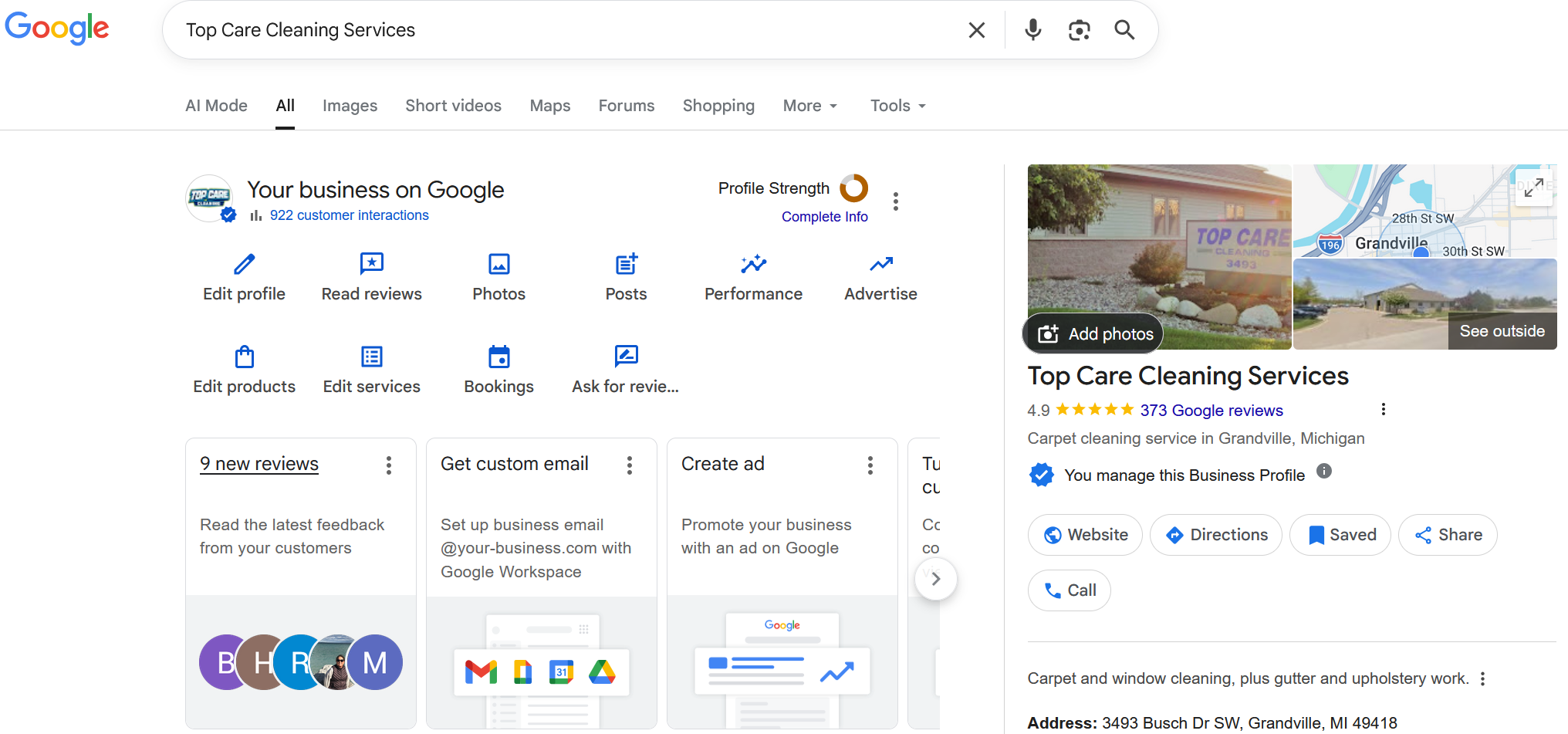
Alex Host runs Top Care Cleaning, a Grand Rapids home services company with 400+ Google reviews, and built Hosted Reviews to automate what he was doing manually. Reviews-facet bio.
I run Top Care Cleaning, a Grand Rapids home services company with 400+ Google reviews, and built Hosted Reviews after manually asking for reviews for years. The data in these articles comes from our own system. — hostedbrands.com/about