By Alex Host · Founder of Top Care Cleaning · Updated 2026-05-04
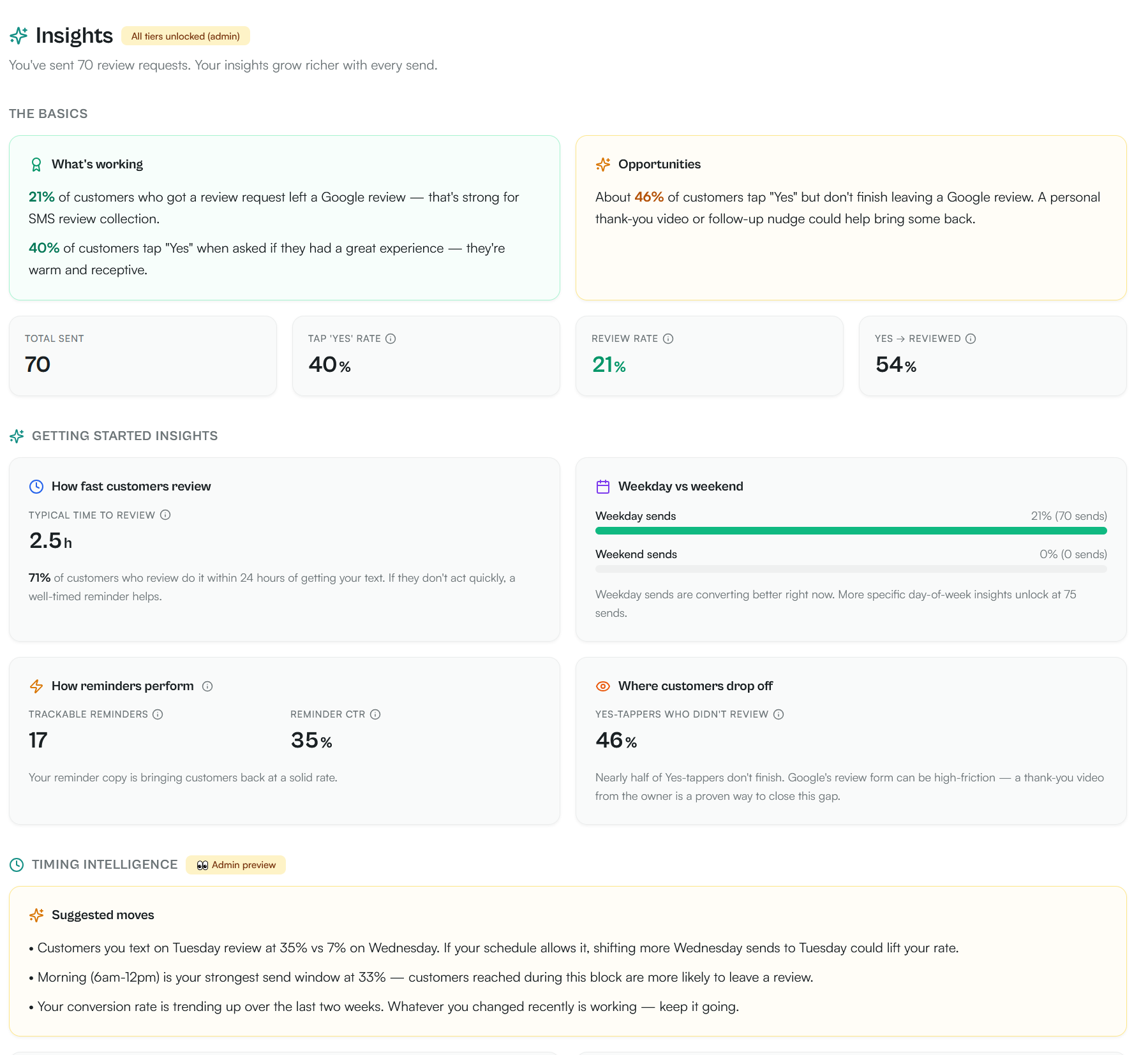
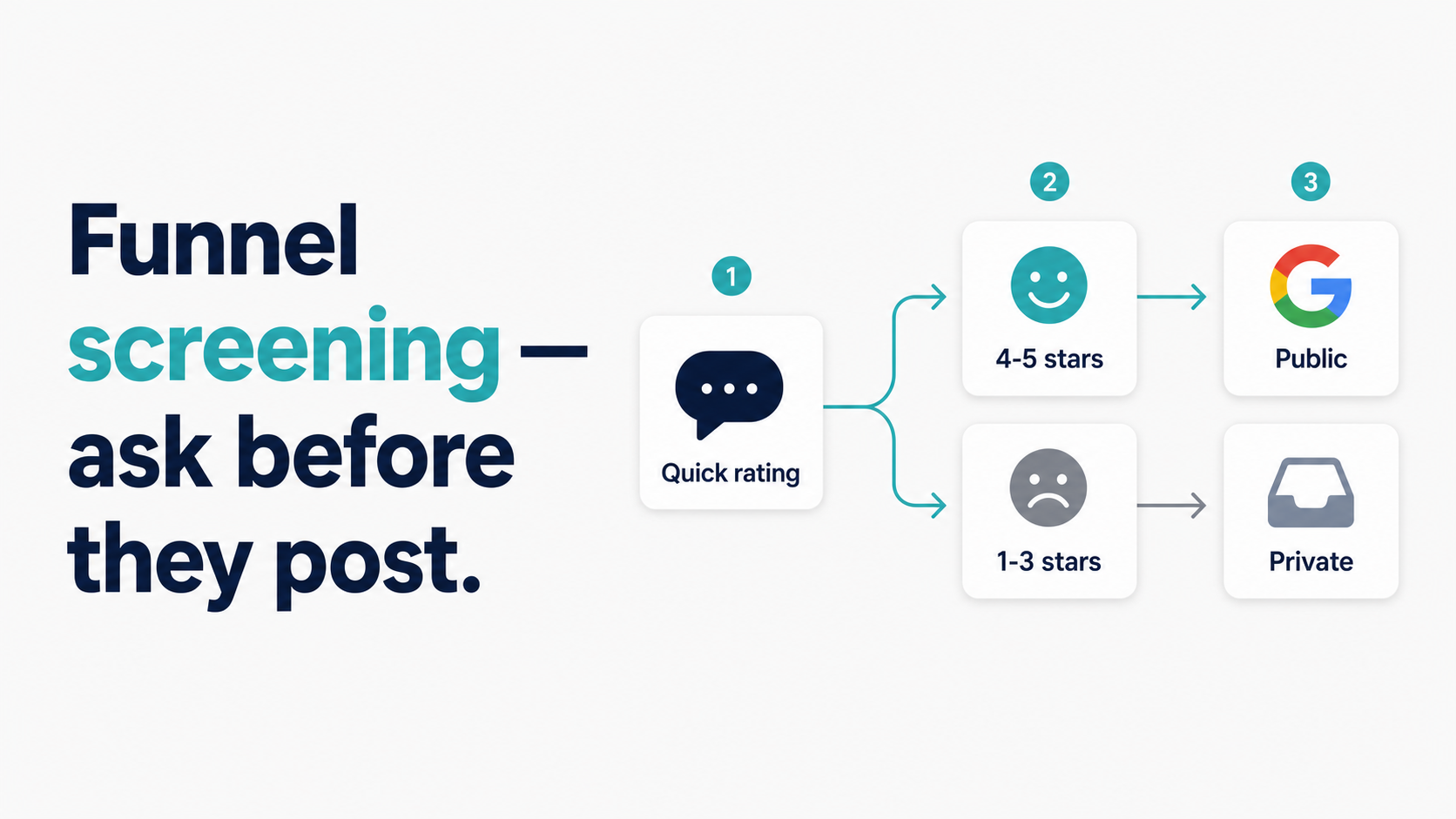
Instead of sending the Google review link directly, send a screening question first: "How did we do today?" Customers tap Yes (happy) or No (issue). Only the Yes-tappers get the review link. At Top Care Cleaning (n=70 sends through 2026-05-04), 40% tap yes, and 54% of those complete the review — a 21% net review-to-send rate.
What funnel screening is and why it works
The direct ask problem
Most service businesses that send review requests send the Google review link directly in the first message. The logic seems right: fewer steps means less friction means more reviews. But it ignores one variable — you do not know whether the customer is happy before you send.
Unhappy customers are more likely to take action than happy ones. Frustration is a stronger motivator than satisfaction for most consumer review behavior. If you send the review link to every customer regardless of their experience, you are making it easier for unhappy customers to find Google and vent in a moment of maximum frustration.
The two-step system interrupts that path. Before the review link goes anywhere, the customer answers one question: did we do a good job? That answer tells you two things: (1) whether this customer is likely to leave a positive review, and (2) whether there is a service problem you need to address.
How two-step screening changes the math
Here is what the funnel looks like in Top Care's data:
| Stage | Count | Rate |
|---|---|---|
| Total requests sent | 70 | 100% |
| Customers who tapped Yes | 28 | 40% |
| Yes-tappers who completed the review | 15 | 54% of yes-tappers |
| Net review-to-send rate | 15 reviews / 70 sends | 21% |
The customers who tapped No, or who did not tap anything, are routed away from the public review path automatically. Some of them had real service issues. Some just did not feel like engaging. Either way, they did not go to Google.
Does this violate Google's review policies?
No. Google's review policies prohibit incentivizing reviews (offering a discount or gift in exchange for a positive review) and writing fake reviews. Routing customers to a private feedback form based on their satisfaction does not fall under either prohibition.
The relevant Google policy is their review contribution policies, which state that reviews must be based on genuine experiences. The two-step system does not prevent any customer from leaving a review — a customer who taps No can still navigate to Google independently and leave a review. The system routes them to a private feedback path first, giving the business a chance to resolve the issue.
The FTC's guidance on review practices distinguishes between "suppressing" reviews (selectively preventing negative reviews from reaching a platform, which is prohibited) and providing a private feedback mechanism (not prohibited). Screening is not suppression.
How to build the two-step ask in practice
The screening message
The screening message goes to the customer first. It is shorter than the review link message and asks one binary question:
"How did we do today, {customer_first_name}? Tap YES if you're happy, NO if something went wrong — {screening_link}"
The screening_link opens a simple page with two buttons. The Yes button triggers the review link delivery; the No button opens a private feedback form.
Keep the screening message under 160 characters so it fits in a single SMS. The yes/no framing is intentional — it requires minimal cognitive effort and has a clear binary response.
What the Yes path looks like
When the customer taps Yes, the review link fires automatically:
"Hi {customer_first_name}, glad to hear it! Here's the quick Google review link: {review_link}. Thanks so much, {tech_name}"
This message sends within seconds of the Yes tap. The customer is still in a positive mental state — they just affirmed their satisfaction. The review link arrives at the exact right moment.
What the No path looks like
When the customer taps No, they go to a private feedback form or receive a service recovery message:
"Hi {customer_first_name}, sorry to hear we didn't meet your expectations. Can we make this right? — [Owner name], [phone or direct message link]"
The goal in the No path is service recovery, not damage control. Most customers who tap No had a specific issue — something was missed, a tech was late, the work quality fell short in a specific area. Addressing that issue directly, promptly, and personally will often turn a dissatisfied customer into a loyal one.
For a full walkthrough of how to handle the No path — including what to do if the customer leaves a negative review after your recovery attempt — see What to Do When a Customer Says No to Your Review Ask.
Setting this up in Hosted Reviews
How the two-step screening feature works
In Hosted Reviews, the screening message is configured as the first step in the review request sequence. When a job is marked complete and the review request fires, the screening message goes out first. The platform handles the routing: Yes tap routes to the review link send; No tap routes to the feedback form.
You configure:
- The screening message text (with merge tags for customer name and tech name)
- The screening page copy and button labels
- The No-path action (feedback form, direct alert to owner, or both)
- The Yes-path review link destination (your g.page Google review link)
The entire flow is visible in the Hosted Reviews dashboard — you can see which customers tapped Yes, which tapped No, and which did not respond.
What happens in the dashboard when someone taps No
When a customer taps No, you receive an alert in the Hosted Reviews dashboard flagging the job as a service recovery candidate. The customer's name, job details, and the No tap timestamp appear in a dedicated "Needs Attention" view. From there, the response is a human task — a call or personal message from the owner or manager, not another automated send.
I built Hosted Reviews to make this flow visible and actionable. The system handles the routing; the recovery conversation is yours to manage. 14-day trial, no card required.
The compliance angle
A2P 10DLC still applies to screening messages
The screening message is an automated business text. A2P 10DLC registration applies to all automated business SMS sends — not just the review link message. Your screening message must include your business name and an opt-out path, same as any other automated marketing message.
For the full compliance picture — including A2P 10DLC registration, opt-in requirements, and TCPA scope — see TCPA Compliance for Review Request Texts: What You Actually Need to Know.
The FTC's stance on review gating
The FTC's guidance on review practices addresses "review gating" — the practice of selectively soliciting positive reviews while suppressing negative ones. The FTC has signaled that review gating is a deceptive practice when it involves only allowing satisfied customers' reviews to reach public platforms.
The two-step screening system is different from review gating in a meaningful way: it does not prevent any customer from leaving a review. A customer who taps No can still go to Google independently. The screening message routes them to a private feedback path — it does not block a review submission. The private feedback path exists to enable service recovery, not to prevent public reviews.
The practical distinction: if your No-path response is service recovery with a genuine attempt to make the customer happy, and the customer can still leave a public review after that interaction, the system is a service quality tool. If your No-path response is "we won't bother you again and hope you forget about it," the purpose becomes evasion rather than service, and the FTC framing would apply more directly.
Templates for the two-step sequence
Screening message
"How did we do today, {customer_first_name}? Tap YES if you're happy, NO if something went wrong — {screening_link}"
Yes-path follow-up
"Hi {customer_first_name}, glad to hear it! Here's the quick Google review link: {review_link}. Thanks so much, {tech_name}"
No-path follow-up (manual, from owner)
"Hi {customer_first_name}, sorry to hear we didn't hit the mark. Can we make this right? Happy to come back and fix it at no charge. — [Owner name], [phone]"
For a broader library of SMS, email, and in-person templates — including variations by vertical — see Review Request Templates: SMS, Email, and In-Person Scripts That Work.
Frequently asked questions
Is two-step screening the same as review gating?
No. Review gating means only allowing satisfied customers' reviews to reach public platforms while suppressing negative ones. Two-step screening routes dissatisfied customers to private feedback — it does not prevent them from leaving a public review. They can still navigate to Google independently. The distinction matters for FTC compliance.
What if someone taps No but then wants to leave a review?
Let them. If a customer contacts you after a No tap and says the issue was resolved and they want to leave a review, send them the direct review link manually. The system should not prevent willing reviewers from reaching Google — it should route unhappy customers to a recovery conversation first.
Can I customize the screening question?
Yes, in Hosted Reviews you can edit the screening message text. The binary Yes/No format is strongly recommended — it minimizes cognitive friction and requires one tap. More complex screening questions (ratings, multiple-choice) reduce response rates.
What percentage of customers should tap Yes?
At Top Care (n=70), 40% tap Yes. A very high yes rate (above 70%) might suggest your screening message is being read as an invitation to review rather than a genuine satisfaction check. A very low yes rate (below 20%) may signal a service quality issue or a message that is being read as a solicitation people want to avoid. 30–50% yes tap rate is a reasonable baseline for a service business.
Does the screening step reduce total review volume?
Directionally yes — by removing the No-path customers from the public review flow. But the net review rate at Top Care (21%) is substantially higher than industry email benchmarks (2–5%) and competitive with other SMS review request approaches. The screening step trades raw send volume for review quality — you are more likely to get 4- and 5-star reviews because you have removed the most frustrated customers from the automated flow.
The system that runs this automatically
I built Hosted Reviews to automate the two-step screening flow for Top Care Cleaning — and now for other local service businesses. 14-day trial, no card required.
About the author
Alex Host runs Top Care Cleaning, a Grand Rapids home services company with 400+ Google reviews, and built Hosted Reviews to automate what he was doing manually. Reviews-facet bio.
I run Top Care Cleaning, a Grand Rapids home services company with 400+ Google reviews, and built Hosted Reviews after manually asking for reviews for years. The data in these articles comes from our own system. — hostedbrands.com/about