By Alex Host · Founder of Top Care Cleaning · Updated 2026-05-04
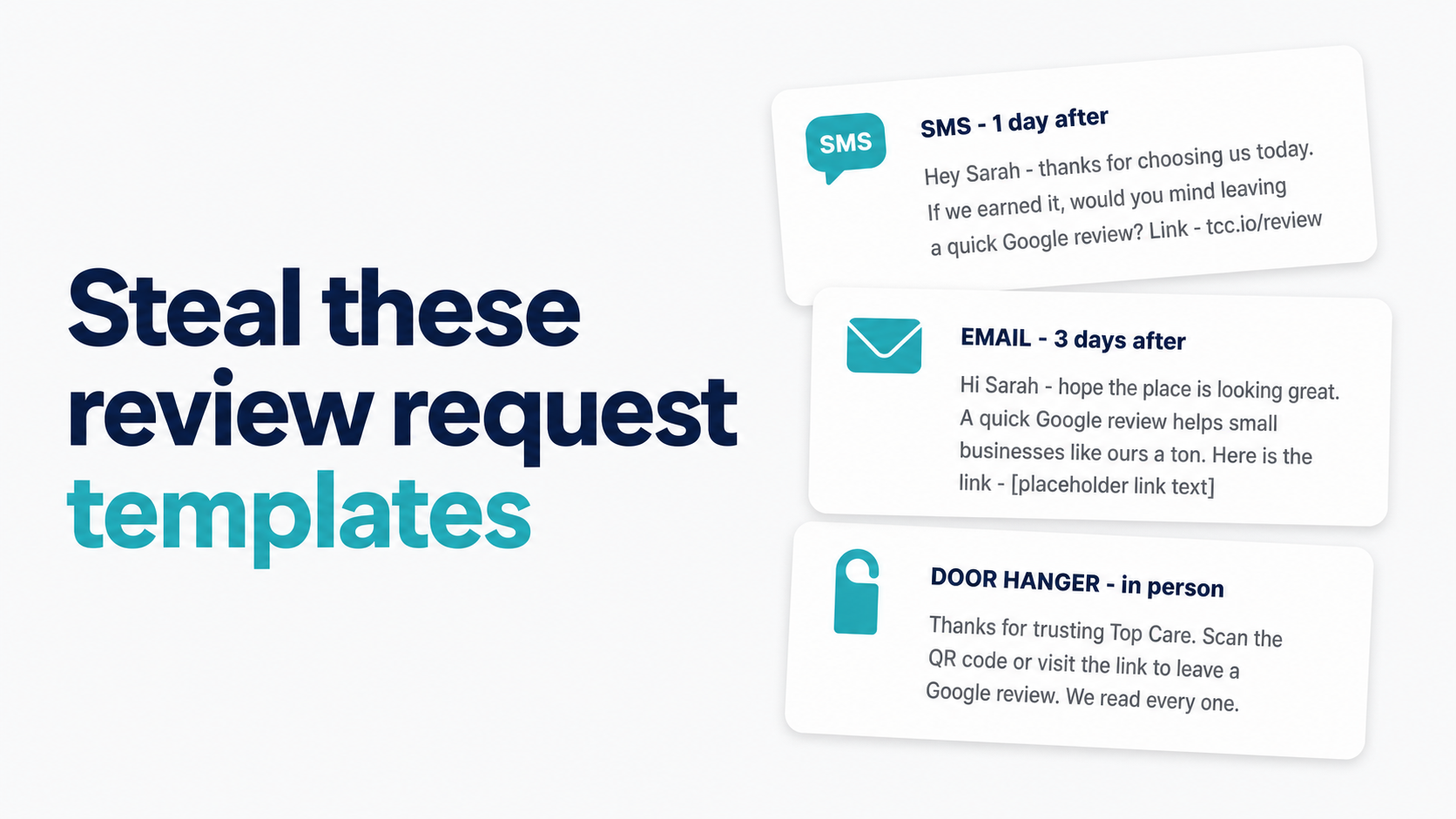
The best SMS review request is one sentence plus a direct link. "Hi [First Name], thanks for having us out today. If you're happy with the clean, we'd love a quick Google review: [link]. — [Tech Name], Top Care" — this template runs at 21% review-to-send in live Top Care sends (n=70). Below are 20+ variations by channel and vertical, including the exact templates we use.
SMS templates (copy-paste ready)
The core template — what Top Care actually sends
The template we send from Top Care Cleaning, with merge tags shown exactly as they appear in our Hosted Reviews account:
Hi {customer_first_name}, thanks for having us out today. If you're happy with the clean, we'd love a quick Google review: {review_link}. — {tech_name}, Top Care
That is 21 words and one link. The template has three functional components:
- {customer_first_name} — basic personalization, signals this is not a mass blast
- The ask — one sentence, one action, no multiple requests
- {tech_name} — the tech is the relationship; signing from the tech rather than the business name creates continuity
This template runs at 21% review-to-send across 70 SMS sends at Top Care (n=70, through 2026-05-04). We have not run a formal A/B test comparing it against a longer version. The 21% is the performance of this template as our default — it is the baseline, not a tested optimum.
The screening version (two-step) adds one step before the review link goes out. If you are using the funnel-screening approach, the template flow looks like this:
Step 1 — Screening message:
How did we do today, {customer_first_name}? Tap YES if you're happy, NO if something went wrong — {screening_link}
Step 2 — Yes-path follow-up (sends automatically after Yes tap):
Hi {customer_first_name}, glad to hear it! Here's the quick Google review link: {review_link}. Thanks so much, {tech_name}
No-path follow-up (manual, from the owner or manager):
Hi {customer_first_name}, sorry to hear we didn't hit the mark. Can we make this right? — [Owner name]
At Top Care, 40% of customers tap Yes on the screening message, and 54% of those complete the review (n=70). For the full mechanics of two-step screening, see Funnel Screening: How to Ask for Private Feedback Before a Public Google Review (publishing in the build cohort).
Variations by vertical
Cleaning / maid service (Top Care's own — highest confidence):
Hi {customer_first_name}, hope the place is looking great. We'd love a quick Google review if you have 2 minutes: {review_link}. — {tech_name}, Top Care
HVAC / heating and cooling:
Hi {customer_first_name}, thanks for having us out today. If the system's running well, we'd really appreciate a Google review: {review_link}. — {tech_name}, [Company]
Pressure washing / exterior cleaning:
Hi {customer_first_name}, hope the house is looking sharp. If you're happy with the wash, a quick Google review means a lot to us: {review_link}. — {tech_name}, [Company]
Plumbing / drain:
Hi {customer_first_name}, glad we could get that sorted for you. If everything's working as it should, we'd love a Google review: {review_link}. — {tech_name}, [Company]
Landscaping / lawn care:
Hi {customer_first_name}, hope the yard's looking exactly how you wanted it. A quick Google review would be a big help: {review_link}. — {tech_name}, [Company]
Disclosure: Top Care is a cleaning vertical only. Templates for HVAC, pressure washing, plumbing, and landscaping are operator-pattern extrapolations from the cleaning template structure — not first-party tested data. Use them as starting points and adjust for your own service type and customer voice.
Short vs long templates — what the data suggests
Short wins directionally. The Top Care template is 21 words. We have seen no evidence from our data that longer templates outperform shorter ones, and industry SMS best practices consistently favor brevity (sub-160 characters fits in a single SMS without carrier splitting).
The practical reasoning for keeping it short: the customer knows who you are. They just had your tech in their home. The message does not need to re-introduce the company or explain what a Google review is. One sentence of thanks, one ask, one link.
Email templates (supplement, not primary channel)
Top Care runs SMS-first. Our email arm is not yet live as of 2026-05-04, which means the email templates below are structural adaptations of the validated SMS template — not first-party tested copy.
For email open rates and click-through benchmarks, we use Mailchimp's service industry category averages (approximately 20–25% open rate, 2–5% conversion for review request emails). Your results will vary.
Subject line patterns
Three subject lines that generate above-average open rates for post-service emails in service businesses:
- "How did your cleaning go, [First Name]?" — personal, specific, signals the email is about their job
- "Quick favor from [Company Name]" — honest and direct; sets expectations before the open
- "Thanks for having us out — one quick ask" — relationship-first, not transactional
Template 1 — Short and direct (cleaning-specific)
Subject: How did your cleaning go, [First Name]?
Hi [First Name],
> Hope the place is looking exactly how you wanted it. We'd really appreciate a quick Google review if you have a couple of minutes — it makes a big difference for a small business like ours.
> [Leave a Google review]
> Thanks,
[Tech Name] and the Top Care team
Template 2 — Slightly warmer (relationship-forward)
Subject: Quick favor from [Company Name]
Hi [First Name],
> It was great being at your place [yesterday/this week]. If you're happy with the work [Tech Name] did, we'd love a Google review.
> It only takes about 2 minutes and helps us a ton: [Review link]
> Really appreciate it,
[Owner Name]
[Company Name]
Template 3 — Minimal (3-line version)
Subject: Thanks for having us out — one quick ask
[First Name] — thanks for the job yesterday. Would you mind leaving us a Google review? [link] It means a lot to us.
> — [Tech Name]
For a full email strategy — including when email makes sense over SMS, CAN-SPAM basics, and automated setup options — see How to Ask for a Google Review via Email (publishing in the build cohort).
Email signature CTA (the always-on passive ask)
Every outgoing email from your team becomes a passive review touchpoint with one line added to the standard signature:
Happy with our work? [Leave us a Google review →]
Small text, below the standard contact info. It does not drive volume spikes, but it converts steadily at zero ongoing effort after setup.
In-person scripts (for the technician at the door)
The end-of-job verbal ask
The best moment for an in-person review ask is the job wrap-up, when the customer is looking at the finished work and the satisfaction is immediate. The script:
"I'm going to send you a text in the next day or so with a link to leave us a Google review. It only takes about 2 minutes — would that be okay?"
Two things this script does right: (1) it primes the customer to expect the text, which increases open rates on the follow-up SMS; (2) it gets verbal confirmation that the ask is welcome, which reduces the chance the SMS feels intrusive.
The leave-behind QR card script
Some customers prefer to act immediately rather than wait for a text. The door hanger or service card approach:
"I'll text you a link, but if you want to leave one right now while I'm here, you can scan this code — it goes straight to our Google review page."
The QR code on the leave-behind is generated from the g.page short link. Shorter URLs produce cleaner QR codes that scan more reliably on mobile cameras.
Training your team to ask consistently
The biggest variable in a review request system at a multi-tech operation is not the template — it is whether technicians actually ask. Training points:
- Explain the business impact (every 10 reviews = measurable lift in map pack visibility for local searches)
- Make the ask a standard part of the job wrap-up checklist, not an optional add-on
- Share the dashboard: show techs their personal review rate so the connection between asking and results is visible
- Avoid pressure framing — "we need 5 reviews this week" creates anxiety; "let the customer know you'd appreciate their feedback" is a better frame
Template table by vertical (quick-reference)
| Vertical | SMS template | Email subject | In-person script |
|---|---|---|---|
| Cleaning | "Hi {name}, thanks for having us out. Happy with the clean? Quick Google review: {link} — {tech}" | "How did your cleaning go, [Name]?" | "I'll send you a text with a review link — would that be okay?" |
| HVAC | "Hi {name}, glad the system's running. If you're happy, a quick Google review helps us: {link} — {tech}" | "How's your [system] running, [Name]?" | "If everything's working right, a Google review would really help us out." |
| Pressure washing | "Hi {name}, hope the house looks great. Quick Google review if you have 2 minutes: {link} — {tech}" | "How's the house looking, [Name]?" | "Before I go — can I send you a link for a Google review?" |
| Plumbing | "Hi {name}, glad we got that sorted. A quick Google review means a lot: {link} — {tech}" | "How's everything running, [Name]?" | "If the job solved the problem, we'd really appreciate a Google review." |
| Landscaping | "Hi {name}, hope the yard looks perfect. A quick review would mean a lot to us: {link} — {tech}" | "How's the yard looking, [Name]?" | "I'll text you a link — just a quick Google review when you have a minute." |
What makes a template actually convert
Four variables that separate templates that convert from templates that do not:
1. Personalization. Customer first name and tech name in the message. Both signals say: we know who you are and who served you. Generic templates miss this.
2. Specificity. Reference the service ("thanks for having us out for your deep clean") rather than a generic thank-you ("thanks for using our service"). Specificity builds credibility.
3. Directness. One ask, one link. Templates with multiple calls to action, multiple links, or a request to "rate us on Google, Yelp, and Facebook" fragment attention. Ask for one thing.
4. Timing. The best template in the world underperforms if it arrives 5 days after the job. Send within 24–48 hours. See The SMS Review Request System for timing data.
If you do not have your Google review link yet, get it first: How to Find Your Google Review Link.
Once you have the link, learn how to distribute it across channels: How to Share Your Google Review Link.
What to do if they do not respond
A customer who does not respond to the first request is not necessarily uninterested. Attention gaps account for most non-responses. The standard recovery path:
- Send one reminder — 3–5 days after the initial request, shorter and lighter than the first ask
- If still no response — move the customer to the passive no path; no further automated contact
Reminder template:
Hi {customer_first_name}, just a follow-up from my earlier text — if you had a great experience with us, we'd still appreciate a quick Google review: {review_link}. Thanks, {tech_name}
For the full reminder cadence and what to do when a customer actively declines, see Reminder Cadence for Review Requests and What to Do When a Customer Says No to Your Review Ask (both publishing in the build cohort).
Frequently asked questions
How long should a review request text be?
Short — under 160 characters is the target (fits in a single SMS without carrier splitting). The Top Care template is 21 words. Research on SMS engagement consistently shows diminishing returns as message length increases. The customer knows who you are; you do not need to re-introduce your business.
Can I include my logo in the SMS?
No — standard SMS (non-MMS) does not support images. If you want to include an image, you need to send an MMS message, which has different character limits and carrier considerations. For review requests, plain-text SMS is simpler, more reliable, and conversion-equivalent to MMS in most service-business contexts.
Do personalized messages convert better?
Based on the structure of the Top Care template and industry SMS benchmarks, personalization (first name, tech name) directionally improves performance. We have not run a controlled A/B test isolating personalization as a variable. The reasoning: a personalized message looks different from a spam text in the customer's inbox, which increases the likelihood they read it — and the tech name specifically creates continuity with the in-person service relationship.
Should I use the Google short link or the full URL in the message?
The g.page short link (generated from your Google Business Profile dashboard) is the right choice for SMS: it is 40–50 characters, routes directly to the review form, and does not expose a raw Place ID string that looks like system-generated noise. Avoid third-party URL shorteners (Bitly, etc.) in SMS — they can trigger carrier spam filters and add an unnecessary redirect.
What if the customer already left a review?
Hosted Reviews tracks click activity on the review link. If a customer has already reviewed, the system can suppress the reminder send. For manual systems, check your Google Business Profile review tab — customer name will appear in the review list if they submitted. If you accidentally send a reminder to someone who has already reviewed, a brief acknowledgment ("Thank you so much for leaving us a review — we really appreciate it!") is appropriate.
The system that sends these automatically
The templates above are what we actually use at Top Care. The difference between copy-pasting them into your phone once and consistently sending them after every job is automation.
If you do not have your Google review link yet, get it here first: How to Find Your Google Review Link.
I built Hosted Reviews to automate this for Top Care Cleaning — and now for other local service businesses. 14-day trial, no card required.
About the author
Alex Host runs Top Care Cleaning, a Grand Rapids home services company with 400+ Google reviews, and built Hosted Reviews to automate what he was doing manually. Reviews-facet bio.
I run Top Care Cleaning, a Grand Rapids home services company with 400+ Google reviews, and built Hosted Reviews after manually asking for reviews for years. The data in these articles comes from our own system. — hostedbrands.com/about