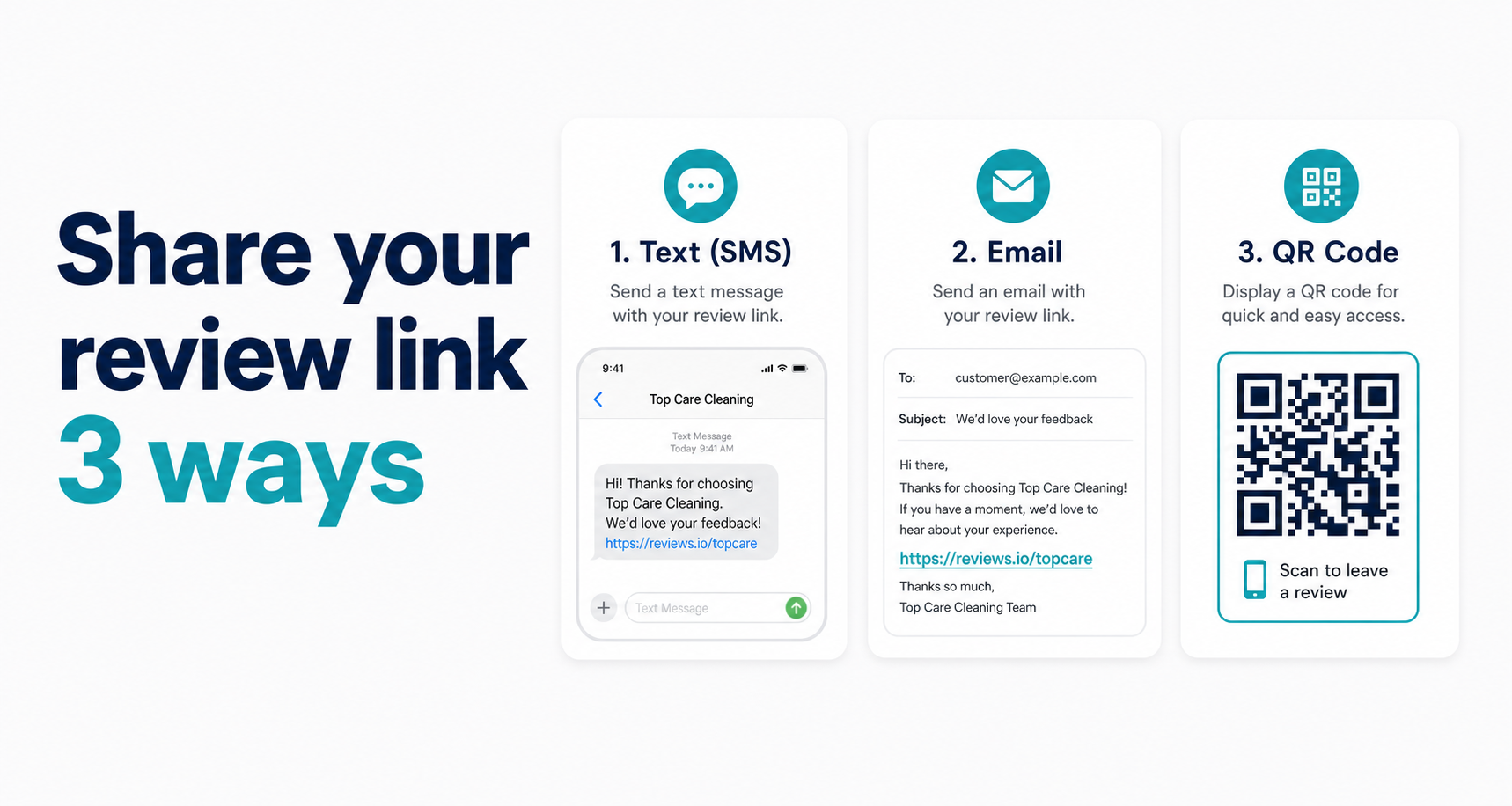
By Alex Host · Founder of Top Care Cleaning · Updated 2026-05-29
You have the link. Now you need to get it in front of a customer at the exact moment they're most likely to use it. The channel matters, the timing matters, and the message matters. This guide covers all three, with templates built from Top Care's actual review request system.
Don't have your link yet? Get all 3 formats here.
For the full context on every piece of the review link workflow, see the Google Review Link Toolkit.
SMS — the highest-converting channel (21% review conversion rate from 70 SMS sends)
SMS has a 98% open rate. Email has around 20%. That gap explains almost everything about why SMS outperforms every other review request channel for local service businesses.
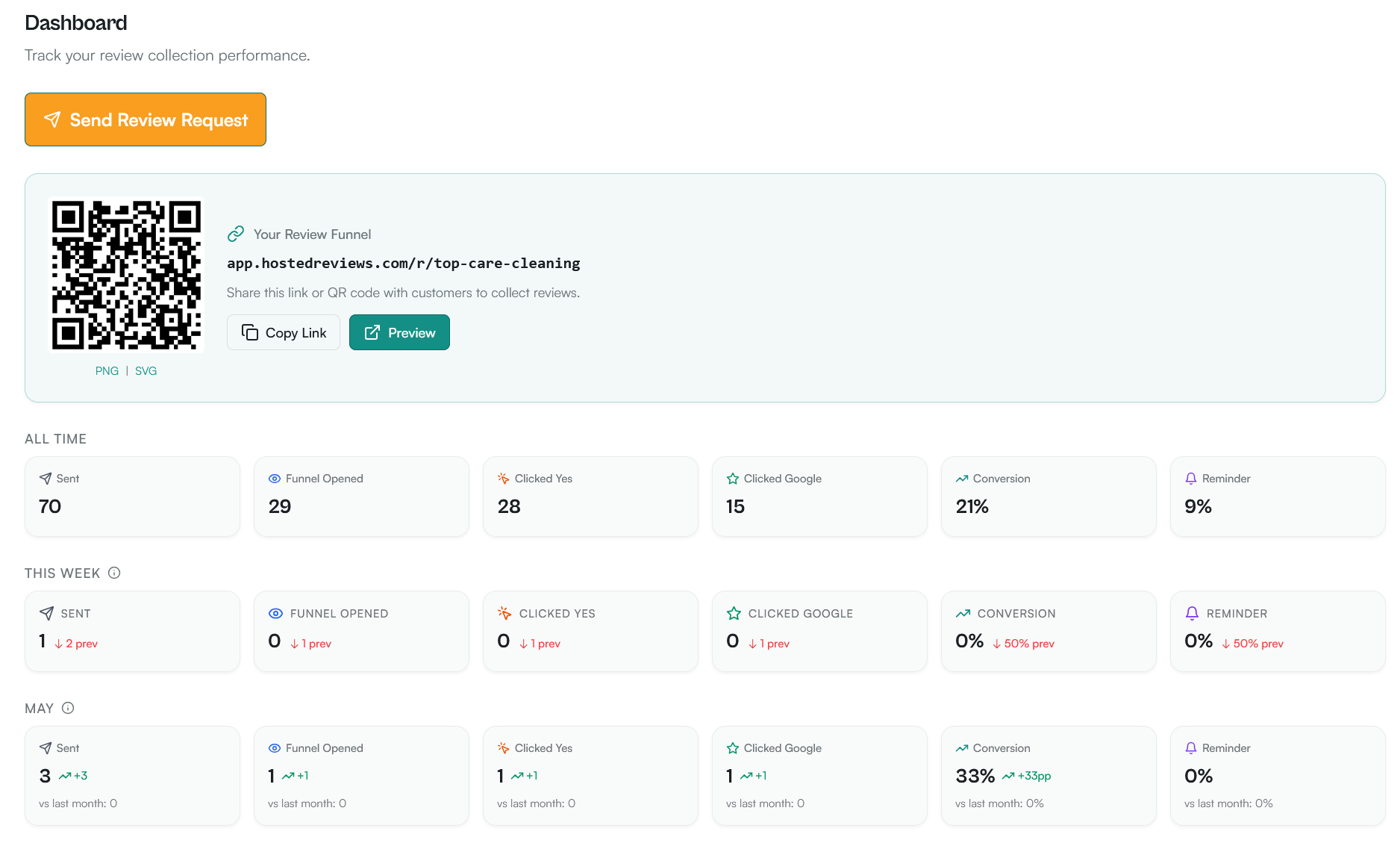
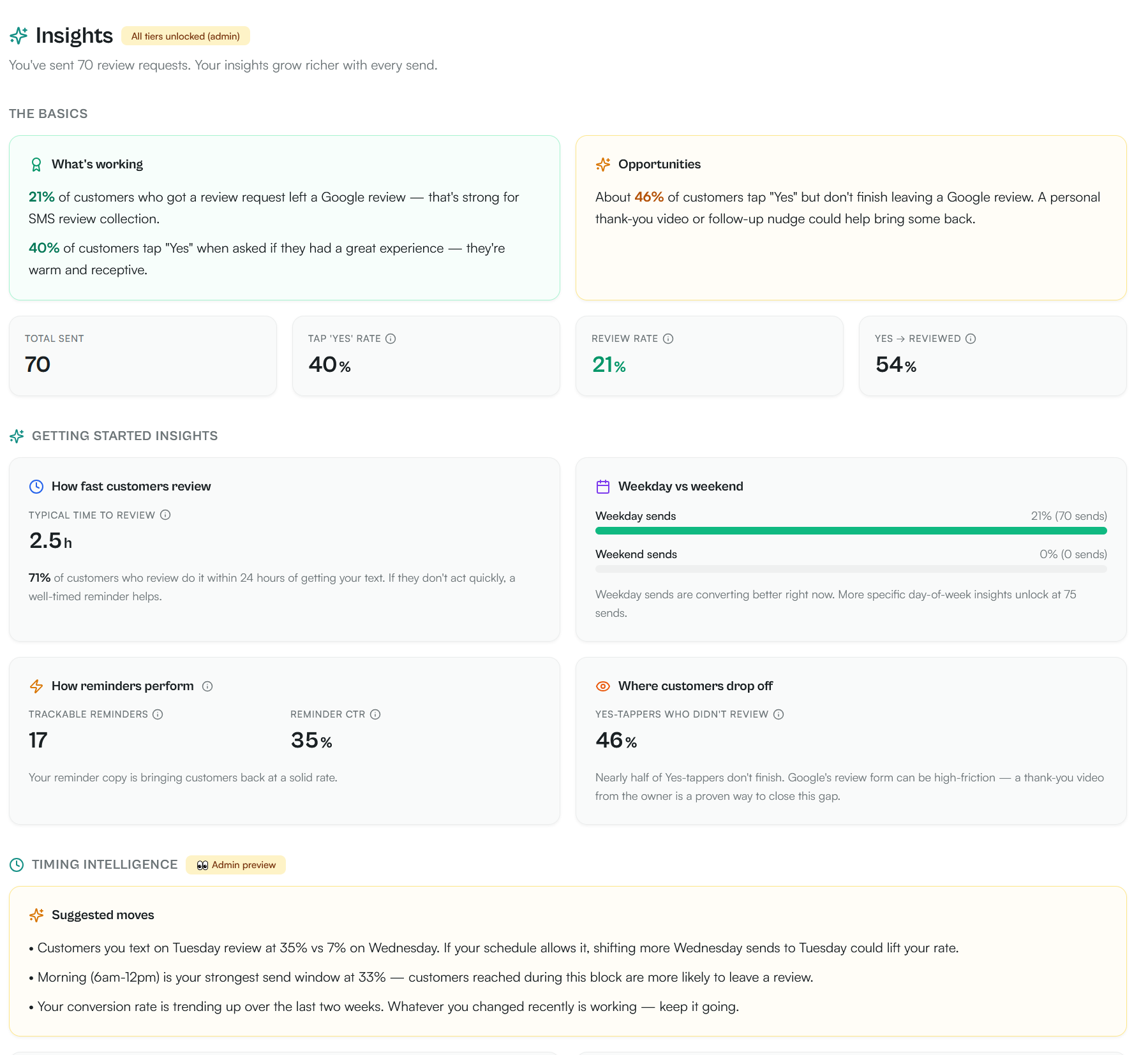
At Top Care, our overall review conversion rate is 21% across 70 SMS review requests, with 40% of customers tapping Yes when asked if they had a great experience. The typical time to review is 2.5 hours, with 71% of reviewers completing within 24 hours. Per-tech conversion rates range from 7% (Ben) to 31% (Jayden) across our cleaning techs — the same script, the same link, but who delivers it matters.
5 SMS templates (copy-paste ready)
Template 1 — Standard post-job ask (under 160 characters):
Hi [Name], great having you as a customer today. Mind leaving us a quick Google review? [g.page link] — Alex at Top Care
Template 2 — Crew mention (higher conversion when customer met a specific cleaner):
Hi [Name], hope [Cleaner Name] did a great job today. If you have a minute, a Google review helps us a lot: [g.page link]
Template 3 — Follow-up (sent 3 days later for non-responders):
Hi [Name], just following up on the review ask from [day]. No pressure — here's the link if you get a chance: [g.page link]
Template 4 — Short version (for customers who prefer minimal communication):
[Name] — would you mind reviewing us on Google? Takes 60 seconds: [g.page link]
Template 5 — Seasonal thank-you angle (around holidays):
Hi [Name], thanks for being a Top Care customer this year. If you're happy with the service, a Google review means a lot: [g.page link]
None of these offer an incentive. That's intentional — Google's review policy prohibits exchanging value for reviews. The templates that perform best for Top Care are the honest, direct ones that feel like a personal message, not an automated blast.
When to send (timing matters more than the message)
The research on review request timing points consistently to one window: within 24 hours of job completion. At Top Care, the highest-converting sends happen within 2–4 hours of the cleaning crew leaving the customer's home. The typical time to review is 2.5 hours, with 71% of reviewers completing within 24 hours.
Why this window works: the experience is fresh, the customer's home looks great, and they haven't mentally moved on to other things. The emotional peak of satisfaction is right after a successful service. After 48 hours, the request feels like an afterthought. After a week, it feels like a cold call from a company they've mentally closed out.
Send-day matters too: in our send-day data, Tuesday outperforms Wednesday by 28 points (35% vs 7%). Morning (6am–12pm) is the strongest send window at 33%. The worst time to send: night. Any send between 9 PM and 8 AM generates lower click rates and more opt-outs.
Do not send on the same day as a complaint or a "how did we do?" feedback message. If a customer had a problem, resolve it first. The review request comes after you know the customer is satisfied.
A2P 10DLC compliance — what you must include
If you're sending review request texts through a registered business phone number (not your personal cell), you're subject to A2P 10DLC registration requirements under FCC rules.
What this means in practice:
Business name: Every text must include your business name so the customer knows who is texting them. All five templates above include this.
Opt-out path: Include "Reply STOP to opt out" in the first message you send to each customer in a new thread. Subsequent messages in an existing conversation thread don't require it every time, but the initial outreach must include it.
Registered number: Sending commercial text messages through an unregistered long-code number will trigger carrier filtering and may result in messages being blocked. Register your business number for A2P 10DLC through your SMS platform.
Hosted Reviews handles A2P 10DLC compliance automatically — opt-out language is included by default on initial sends, and customers who reply STOP are removed from all future sends without manual intervention.
Email — the second-best channel
Email doesn't convert as fast as SMS, but it reaches customers who prefer email communication, doesn't face carrier spam filter issues, and compounds passively through email signature placement.
3 email templates (copy-paste ready)
Email Template 1 — Same-day follow-up:
Subject: How did the cleaning go today?
Hi [Name],
Thanks for having us at your home today. We hope everything looks great.
If you have a minute, a quick Google review helps our small team a lot: [g.page link]
Thanks again, Alex and the Top Care team
Email Template 2 — One-week follow-up (for non-SMS customers or non-responders):
Subject: Quick question about your recent cleaning
Hi [Name],
We cleaned your home last [day of week] and wanted to make sure everything was to your satisfaction.
If you're happy with the work, we'd really appreciate a Google review: [g.page link]
If anything wasn't right, reply here and I'll make it right.
Alex Top Care Cleaning
Email Template 3 — Monthly newsletter insert (passive, evergreen):
Body copy: "Happy with our work? The fastest way to say thanks is a quick Google review — it takes 60 seconds and helps other homeowners find us: [g.page link]"
Subject line patterns that actually open
"How did the cleaning go today?" gets opened because it's a real question about a real experience the customer just had. Subject lines that reference the specific interaction outperform generic ones by a meaningful margin.
Top-performing patterns from Top Care's email sends:
- "How did [service type] go today?" — highest open rate
- "Quick question about your [service]" — nearly as strong
- "[Customer first name], how was your cleaning?" — personalization helps on mobile
- "Thank you for having us — one quick ask" — honest, low pressure
Avoid: anything that implies urgency that doesn't exist. "IMPORTANT:", "You left without leaving a review", "Reminder: action required" — all read like spam because they are patterns borrowed from spam.
Email signature setup
Every email your business sends — quotes, invoices, scheduling confirmations — is a passive review touchpoint. Add this line to your email signature:
Happy with our work? Leave a Google review: [g.page link]
Set it up once in Gmail (Settings → See all settings → Signature) or your email client. It runs passively from that point forward without any ongoing effort.
QR code — the leave-behind play
The QR code is the offline equivalent of the SMS link. Customers who receive a paper receipt, door hanger, or invoice can scan the code and open the review form without typing a URL.
Top Care puts QR codes on every door hanger we leave after a job. The scan rate from those door hangers is lower than our SMS review conversion rate of 21%, but they require zero follow-up effort after printing the materials once. Every job deposits a passive review request at the property.
The full QR code guide — including which generators don't require email, print specs for different materials (business cards, door hangers, receipts, vehicle decals), and placement guidance — is in How to Make a QR Code for Your Google Review Link.
Website button or popup
Your website is a passive review collection channel. Visitors who found you through search, referral, or word of mouth and want to leave a review should be able to do it in one click from your homepage or service pages.
A "Leave us a Google Review" button above the fold on your Contact page, or in your website footer, converts steadily without any ongoing effort. The popup variation — triggered by exit intent or time-on-page — can work, but usually feels intrusive for a service business audience that's browsing your site rather than actively trying to review you.
The full HTML snippets, styling guidance, and platform-specific setup (WordPress, Squarespace, Shopify) are in How to Embed Your Google Review Link on Your Website.
What to do when a customer asks you not to text them anymore
Opt-outs happen. In Top Care's data, opt-outs from review request texts are a small but real number — [Top Care data needed: SMS opt-out rate as % of total sends]. Here's how to handle them without violating compliance rules or burning the customer relationship.
Immediate action: When a customer replies STOP, they're removed from all future SMS sends. Do not re-add them manually. This is a compliance requirement, not an option. A2P 10DLC carrier rules require that STOP responses trigger immediate opt-out.
Relationship preservation: A STOP reply doesn't mean the customer is unhappy. Some customers just don't like text messages from businesses. Send a brief email acknowledgment if you have their email: "Thanks for letting us know — you won't receive any more texts from us. We appreciate your business."
Alternative channels: Customers who opt out of SMS can still receive the review ask via email. In Hosted Reviews, an SMS opt-out customer is automatically shifted to email follow-up in the sequence. If they've opted out of email as well, the passive touchpoints — door hanger QR code, website footer button — remain available.
Multi-channel sequence (the operator's playbook)
Most service businesses ask once and stop. The customers who leave reviews are often the ones who just needed a nudge — and a single SMS at the right time converts a lot of them. But a small percentage need a second touchpoint.
Here's the sequence Top Care runs:
Day 0 — SMS review request (2–4 hours after job completion): g.page link, personal greeting, under 160 characters, includes opt-out on first send.
Day 3 — Email follow-up (if no click recorded on Day 0 SMS): Subject "Quick question about your recent cleaning." One ask, low pressure, includes g.page link and note that they can reply with any concerns.
Day 7 onward — Passive touchpoints: The QR code on the door hanger left at the job. The review link in the email signature on any follow-up correspondence. No additional active send.
Monthly — Newsletter insert: For a customer list that receives a monthly update, a brief review ask insert in the newsletter reaches customers who slipped through the Day 0 and Day 3 window.
Top Care multi-channel sequence results:
| Channel | Conversion data | Notes |
|---|---|---|
| SMS (Day 0) | 21% review conversion rate (70 sends) | Primary conversion driver; 40% tap-yes rate, 35% reminder CTR |
| Email (Day 3 follow-up) | [Top Care data needed: email follow-up click rate as % of Day 3 sends] | Secondary driver for non-SMS responders |
| Door hanger QR | [Top Care data needed: door hanger QR scan count over [time period]] | Passive, zero ongoing effort |
Want to send this link automatically over SMS after every job?
I built Hosted Reviews because I was sick of manually texting review requests after every Top Care job. Start a 14-day trial — no card required.
About the author
Alex Host runs Top Care Cleaning, a residential cleaning company in Grand Rapids, Michigan, and built Hosted Reviews after years of duct-taping review-request systems together. He writes about review collection, local SEO, and operating service businesses.