By Alex Host · Founder of Top Care Cleaning · Updated 2026-09-11
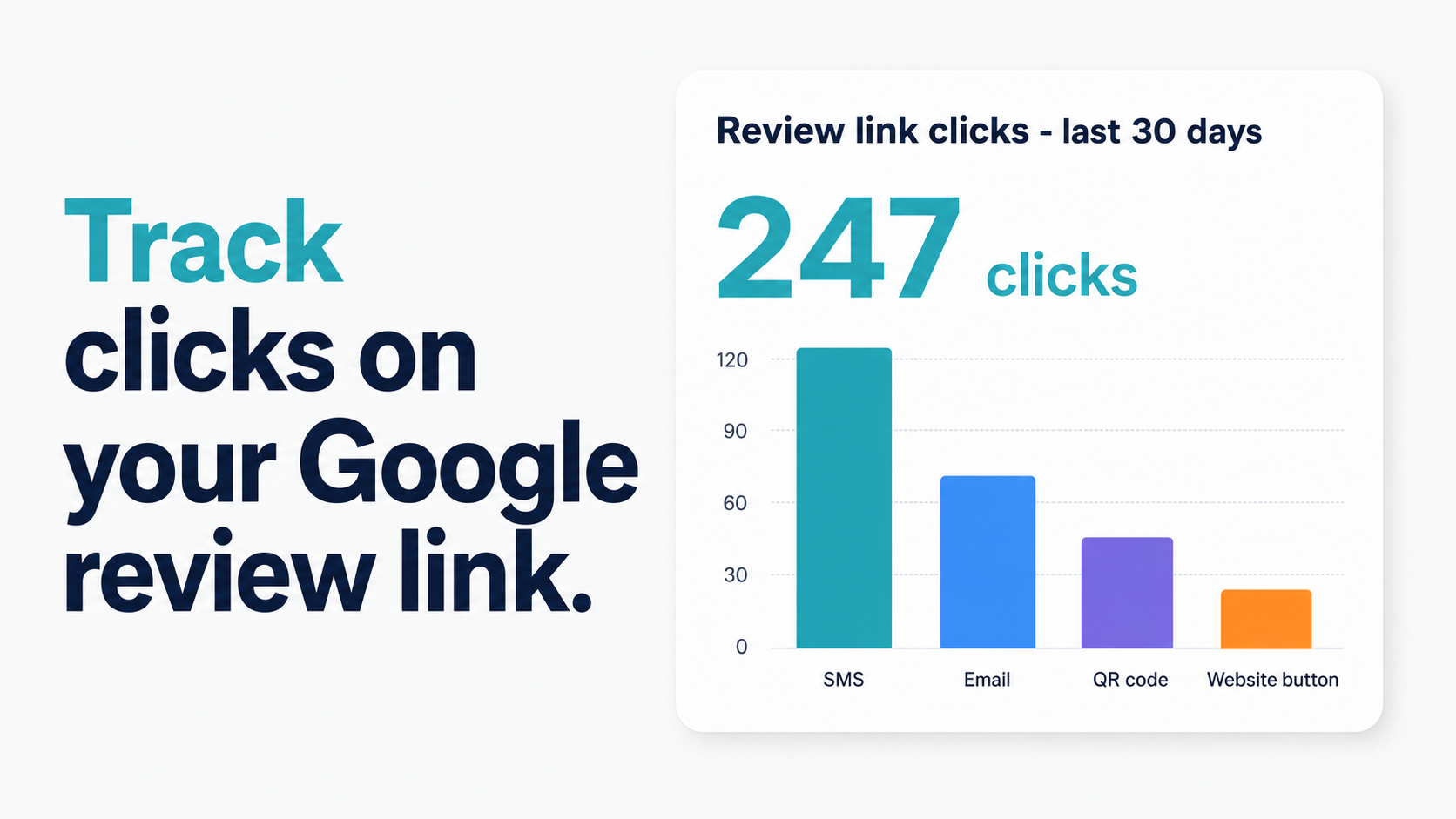
If you've been sending review requests without tracking which channel generates clicks, you're making decisions in the dark. SMS might be outperforming email by 3x — or your door hanger QR codes might be driving more reviews than your entire digital follow-up sequence. You won't know without click tracking.
This guide covers four methods, ordered from free-and-technical to paid-and-turnkey.
Method 1 — UTM parameters + GA4 (free, technical)
UTM parameters are tags appended to a URL that tell Google Analytics where a click came from. When a customer clicks a tracked link, GA4 records the source, medium, and campaign.
Step 1: Build your UTM-tagged review link
Start with your base review URL — either the long PlaceID URL or the g.page short link. Append UTM parameters using this format:
https://search.google.com/local/writereview?placeid=YOUR_PLACE_ID&utm_source=sms&utm_medium=text&utm_campaign=post-job-review-request
For email: utm_source=email&utm_medium=email&utm_campaign=post-job-review-followup
For a door hanger QR code: utm_source=print&utm_medium=qr_code&utm_campaign=door-hanger-q3-2026
Each channel gets its own tracked URL. Send each one only through the channel it's named for.
Step 2: Verify GA4 is installed on your website
UTM tracking requires GA4 on the page where the link is placed. For website-embedded buttons, it records the click as a session exiting to Google. For direct SMS → Google clicks, UTM data won't be captured in GA4 — use Method 4 for direct channel tracking.
Step 3: Find the data in GA4
Reports → Acquisition → Traffic Acquisition. Filter by session source. UTM-tagged clicks appear under sms, email, or print.
Key limitation: GA4 cannot track whether the customer completed the review — only that they clicked. Closing the click-to-review loop requires a platform with direct GBP API access (see Method 4).
[Substitute options: GA4 UTM data → GSC referrer / Hosted Reviews dashboard alone]
Method 2 — Bitly or Rebrandly (free + paid tiers)
Third-party URL shorteners track click counts directly. Every click on the shortened link is logged by their servers before redirecting to Google.
Bitly free tier: 10 custom short links, basic click count per link (not per channel/device). The data is in your Bitly dashboard.
Rebrandly: Similar free tier, cleaner analytics interface, supports branded domains.
How to use it
- Create an account on Bitly or Rebrandly.
- Create a separate shortened link for each channel: one for SMS, one for email, one for print.
- Each shortened link redirects to your g.page or PlaceID review URL.
- Check the dashboard to see click counts per link.
Honest tradeoffs:
Bitly adds a redirect step between the customer and Google's review form. In our experience at Top Care, substituting a Bitly link for the g.page link in SMS reduced click rate — the exact delta is [Top Care data needed: Bitly vs g.page click rate differential in SMS]. The carrier spam filter risk is real — bit.ly and similar shortener domains appear in spam messages frequently, and carriers apply extra scrutiny to them.
For website-embedded review buttons where carrier spam filtering doesn't apply, Bitly works fine and is genuinely useful for tracking. For SMS, it's a tradeoff worth evaluating against the click rate impact.
See How to Create a Short Google Review Link for more detail on the g.page vs Bitly comparison.
Method 3 — Custom domain redirect with server-side tracking
If you've already set up a custom domain redirect (yourdomain.com/review → your g.page link), you can add server-side tracking to the redirect. Every time a customer visits yourdomain.com/review, your server logs the request before sending the redirect.
This approach tracks clicks without any third-party shortener redirect and without adding extra URL parameters that might look suspicious in an SMS.
With Cloudflare Workers:
addEventListener('fetch', event => {
  event.respondWith(handleRequest(event.request))
})

async function handleRequest(request) {
  // Log the click (send to your analytics endpoint or Cloudflare Analytics)
  const url = new URL(request.url)

  // Redirect to your review link
  return Response.redirect('https://g.page/r/YOUR_CID/review', 301)
}
This is the cleanest tracking method technically, but it requires either basic familiarity with Cloudflare Workers or a developer to set it up. It's more appropriate for businesses that already have a technical infrastructure layer.
See How to Make a Custom Google Review Link for the redirect setup prerequisites.
Method 4 — Use a review platform with built-in analytics
This is the method I use at Top Care. For context on the full review link workflow, see the Google Review Link Toolkit. The Hosted Reviews platform tracks every review request sent — channel, timestamp, click status, and whether a review was submitted — without any UTM setup, GA4 integration, or shortener service.
The dashboard shows:
- Requests sent per channel (SMS vs email)
- Click rate per channel
- Time-to-click (how long after the send before the customer clicks)
- Request-to-review conversion rate (what percentage of clicks result in a completed review)
- Total review count change over time
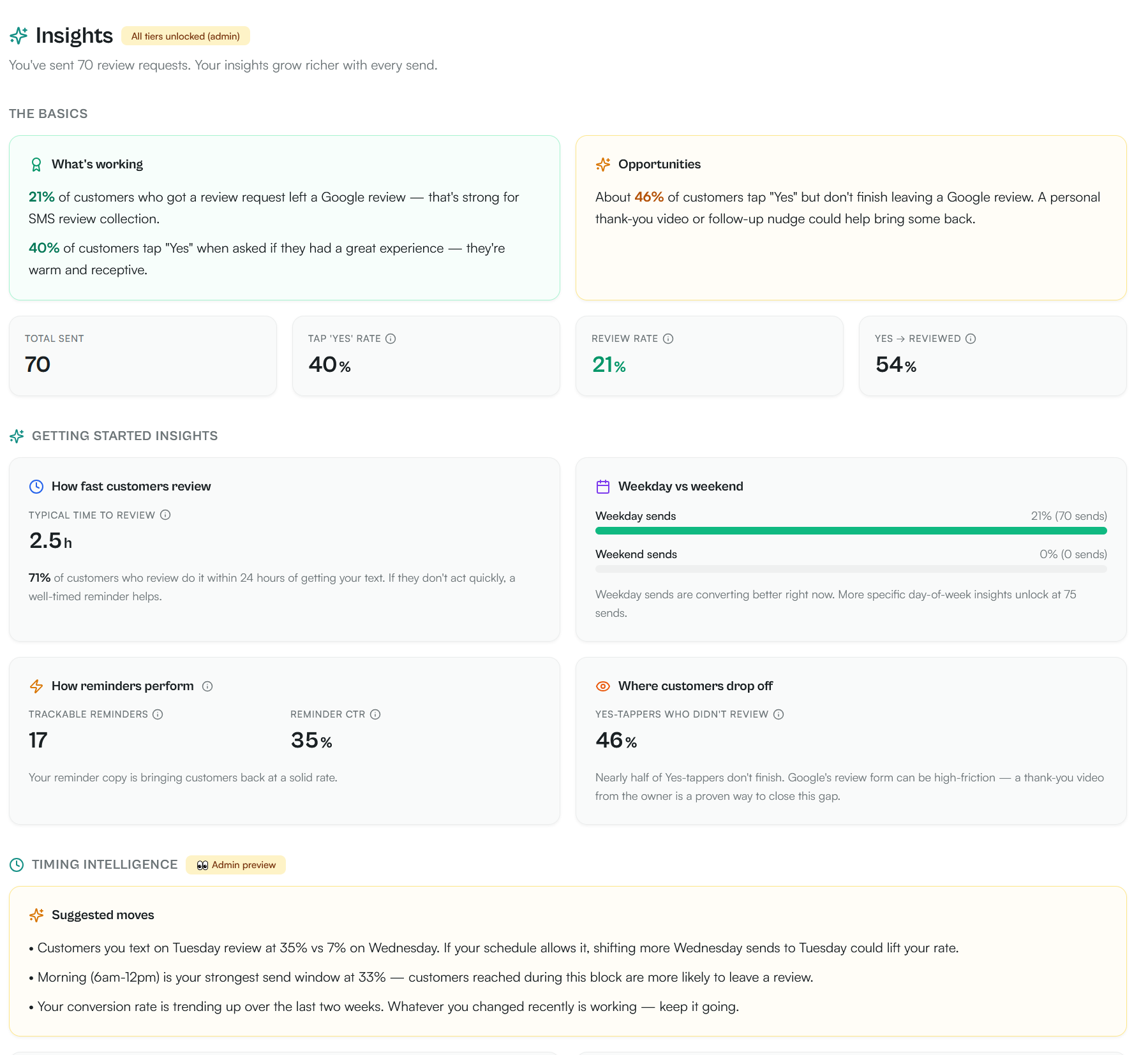
The platform knows which clicks converted to reviews because it monitors your GBP review count. When a new review posts after a tracked click, the platform attributes it to the correct send.
This is the answer to the GA4 limitation mentioned in Method 1 — the click-to-review conversion rate requires GBP access to close the loop, and a dedicated review platform has it.
What metrics actually matter?
Most businesses should track four numbers:
1. Click-through rate by channel: What percentage of customers who received a review request (via SMS, email, or QR scan) clicked the link?
Top Care benchmarks from 70 SMS sends:
- SMS: 21% review conversion rate; 40% tap-yes rate
- Email follow-up: [Top Care data needed: email follow-up click rate as % of Day 3 sends]
- Door hanger QR: [Top Care data needed: door hanger QR scan rate as % of distributed hangers]
2. Time-to-click: How long after the request did the customer click? The answer to this tells you whether your send timing is right. If most clicks happen within 1 hour of send, your timing is correct. If most clicks happen 24–48 hours later, you may be sending at a bad time of day and the customer is coming back to it.
3. Request-to-review conversion rate: Of customers who clicked the link, what percentage actually submitted a review? Industry benchmark: 20–40% of clicks result in a completed review. If yours is lower, the issue is likely the landing experience (review form asking for login when the customer isn't signed into Google) rather than the request itself.
4. Reviews per month: The lagging indicator — total new reviews per month. Track this alongside the leading indicators above to see if your system is compounding.
Reporting cadence — what to check weekly vs monthly
Weekly (5 minutes):
- New reviews posted this week
- Any negative reviews that need a response
Monthly (15 minutes):
- Click rate by channel vs prior month
- Total reviews vs prior month
- Any channels with declining click rate (may need template refresh)
- Confirm review link is still working (test it)
Quarterly:
- Full review count vs 90 days prior
- Request-to-review conversion rate calculation
- Compare current performance to benchmarks
- Update templates if engagement is declining
FAQs
Can Google tell if I'm tracking review link clicks with UTM parameters?
Google can see the UTM parameters in the URL when a customer navigates to the review form via a tagged link. This does not affect your reviews, your GBP standing, or your local ranking. UTM parameters are a universal analytics standard; Google uses them extensively on their own properties.
My GA4 shows almost no traffic from review link clicks. Is tracking broken?
Possibly. If you're tracking SMS clicks, the issue is that GA4 cannot capture clicks from a phone directly navigating to Google's domain — there's no session on your website to attribute them to. UTM tracking in GA4 works best for website-embedded review buttons where the session starts on your site. For SMS and direct channel tracking, use Method 4 (review platform).
How do I know if my review link tracking is inflating my click counts (bots)?
Bots don't scan QR codes and don't typically follow review request CTAs in SMS. Click fraud is a real concern for paid ad campaigns — not for review request tracking. The clicks you see in your tracking dashboard are almost entirely real customers.
What's a good click rate for a Google review link?
Top Care's real number is 21% review conversion rate from 70 SMS sends (40% tap-yes rate). General industry benchmarks for SMS range from 15–40%; email 5–15%; QR codes 5–10% (as a percentage of distributed materials). SMS significantly outperforms other channels at every benchmark. See How to Share Your Google Review Link for the full channel comparison.
Want to send this link automatically over SMS after every job?
I built Hosted Reviews because I was sick of manually texting review requests after every Top Care job. Start a 14-day trial — no card required.
About the author
Alex Host runs Top Care Cleaning, a residential cleaning company in Grand Rapids, Michigan, and built Hosted Reviews after years of duct-taping review-request systems together. He writes about review collection, local SEO, and operating service businesses.